Why You Can't Reproduce That Unity Bug (And What Actually Fixes It)
Non-reproducible bugs are reports where the developer assigned can't get the failure to happen on their machine. In industry studies they make up a large minority of all reports, stay open longer, and often trace back to missing environment or sequence data — not a fake report.
QA files a ticket with a screenshot and a loose description. You load the same build on your desk phone — different OS, clean save, plenty of RAM — and nothing happens. You mark Cannot Reproduce, the ticket stalls, and the same issue shows up later in a store review. That loop is one of the most common sources of friction between QA and engineering in mobile Unity work. This article is about why it happens, what the research actually says, how to tighten your process without new software, and where tooling fits — what each class of tool is good and bad at.
"Cannot reproduce" usually means insufficient context, not that QA was wrong.
The scale of the problem (with sources)
Empirical work on real trackers sets a lower bound on how often this hurts. Joorabchi et al., in Works For Me! Characterizing Non-reproducible Bug Reports (MSR 2014), mined tens of thousands of reports and found that about 17% of bug reports were non-reproducible on average across their sample. Those tickets remained active about three months longer than comparable reproducible ones. In the same study, about 14% of non-reproducible failures were attributed to insufficient information — the report simply did not contain enough to retry the scenario. About two-thirds of non-reproducible reports that were eventually "fixed" were later reproduced — the defect was often real; the write-up wasn't.
Masud et al. (Why are Some Bugs Non-Reproducible?, ICSME 2020), synthesizing hundreds of Firefox and Eclipse cases, list recurring factors: environment configuration, missing steps, timing and concurrency, state-dependent behavior, and build or version mismatch. Those categories map almost directly onto Unity mobile shipping.
Industry-facing summaries add directional numbers — treat them as order-of-magnitude, not lab-precise: practitioner surveys cited in reports such as Shake's overview of app bug statistics claim roughly nine in ten developers have backlog items stuck on irreproducibility; other commentary puts on the order of 40% of developers naming inability to reproduce as a top tracker problem. QA methodology pieces (for example BrowserStack and similar) often cite more than half of bug reports as missing steps, outcome detail, or setup data. Your mileage varies by team — the direction is consistent: first-pass reports are usually incomplete.
So in the literature, non-reproducibility is a normal, expensive failure mode — and "insufficient info" is a first-class cause, not an edge case.
What "cannot reproduce" really means in a Unity inbox
On mobile Unity projects, the failure pattern is predictable. QA captures what is easy — often a screenshot — and describes what felt true ("played for a while, then it crashed"). The developer doesn't share the tester's device model, GPU, OS patch, save progression, memory pressure, build type, or network path. None of that is visible in a PNG.
Forum language mirrors the confusion. A Unity Discussions thread is literally titled "There is a race condition or something similar that can cause a crash" — hedging because the reporter can't see ordering. Threads on inconsistent behavior between Editor, Mono, and IL2CPP are full of developers who only see a crash once code runs through a different backend or stripping profile. That's not QA sloppiness; it's information asymmetry between environments.
If you wouldn't ship without knowing build target and platform, you shouldn't triage without knowing device, OS, build, and log sequence.
Why Unity bugs fail to reproduce on your machine
These are the main categories from academic work on non-reproducibility (Joorabchi; Masud), Unity Issue Tracker entries, and common mobile constraints. They overlap — one bug can hit several at once.
Device hardware fragmentation
Some failures only appear on a specific GPU family (for example Adreno vs Mali shader paths), texture format support, or screen density that changes UI hit regions. Android alone spans billions of devices and many manufacturers; iOS has fewer models but still meaningful GPU and resolution differences. If your desk device is a flagship and QA used a budget phone, you may never see the same pixel or timing path.
Mismatching hardware is a reliable way to get "works on my phone."
OS version differences
Behavior changes across iOS and Android versions — permissions, background execution, networking, graphics APIs. A bug tied to iOS 16.x vs 17.x or Android API 31 vs 33 won't show up if your test OS doesn't match. Without the exact OS string in the report, you're blind.
Treat OS patch level as required metadata, not a nice-to-have.
Race conditions and timing
Non-deterministic ordering between threads, jobs, coroutines, ads, analytics, and the main thread produces crashes that don't repeat on demand. Unity's Issue Tracker includes cases such as race conditions around application pause on Android; the Job System can crash when jobs and the main thread touch the same data without synchronization. A faster machine or different load changes the window.
You won't "repro" a race by walking the same steps like a script; you narrow it with ordering evidence — logs, profiler captures, and safety checks in development. For races, sequence beats repetition.
Game state and save data
Many defects require a specific save, inventory, tutorial flag, or migration edge after an update. Your clean QA build or designer save may never reach that state. PlayerPrefs and file-backed persistence have their own platform quirks — including documented corruption edge cases on certain OS versions — so "fresh install on dev kit" isn't a substitute for the user's data.
State is part of the reproduction, not an afterthought.
Build configuration differences
Development vs release, Mono vs IL2CPP, managed code stripping, and scripting backend choices change what runs and what survives stripping. Code that works in the Editor may fail under IL2CPP when reflection touches stripped types. That's a known pattern in community threads comparing backends — invisible if the ticket doesn't say which build failed.
If QA tests a release candidate and you test a dev build, you're often debugging different programs.
Memory pressure and device resources
Low-RAM devices hit out-of-memory paths, low-memory killer behavior, and texture budgets that high-RAM phones never stress. Memory warnings and native heap growth from plugins may not show in Editor profiling. The same build can be stable at 8 GB and fragile at 2 GB.
RAM and warnings belong in the environmental record.
Network state
Failures that depend on offline, captive portal, high latency, or VPN routing are invisible in a screenshot. Unity and third-party SDKs may time out, retry, or leave queues in different states depending on connectivity.
Ask what the network looked like, not only whether the device was online.
Missing context (the usual suspect)
Across the studies above, missing steps and missing context are a large slice of the problem. QA isn't always trained to pull ADB logcat or Xcode device logs; on iOS, getting logs without a Mac and Xcode is a real barrier. Screenshots are easy; structured metadata and log files are not.
Fix the capture path, not only the template.
The manual workflow (what works — and where it breaks)
You can improve outcomes a lot before adopting any product.
Standardize the report. Require device model, full OS version, build number and flavor, numbered steps from launch, expected vs actual, frequency, and network conditions. That alone cuts vague tickets.
Centralize device info through your tracker's required fields or an in-game "report bug" form so QA can't skip them.
Obtain logs the hard way: ADB on Android (USB or wireless, developer settings, SDK installed) and Xcode device logs on iOS. These are powerful — and they assume developer-grade access. Most QA labs don't have frictionless access to both.
Iterate on steps with the tester. In practice the QA → developer loop often takes three to five rounds of messages — device questions, log requests, partial captures — before you either fix the classification or give up. By then, game state may have moved on and the bug may not fire again on demand.
That cycle is the structural problem: latency and skill mismatch, not lack of good intentions.
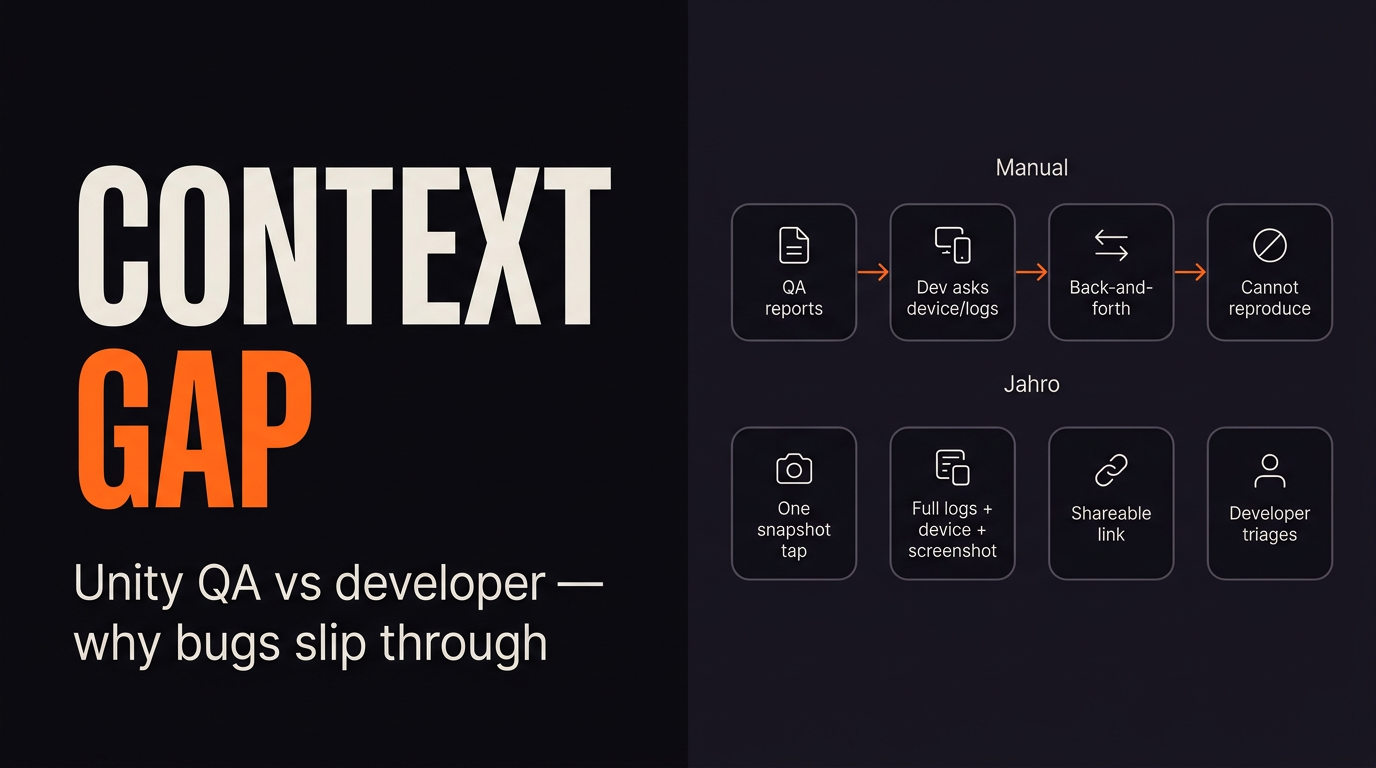
Templates help; log extraction without tooling is usually where manual process stalls.
Tools in the space (honest boundaries)
Different tools solve different jobs. None of them remove the need for good project hygiene.
In-game consoles (for example Lunar Console) are strong when developers want a fast on-device log view and filtering. They aren't primarily built around QA capture, web share links, or session packages for your issue tracker. If you need to see logs while you play, they fit. If you need QA to hand the team a single artifact the producer can open, that's a different product shape.
Remote loggers (for example Bugfender) are useful for shipping logs to a server; typically you instrument logging through their API rather than only Debug.Log. That's a trade: integration work and ongoing log policy, in exchange for centralized logs. They usually aren't a screenshot-plus-state bundle by default.
Platform tools (ADB, Xcode) are ground truth for many engineers. They're weak for distributed QA because of cables, provisioning, and expertise. They don't fail technically; they fail operationally at scale.
General mobile SDKs (Instabug-class products) are often aimed at non-Unity-first mobile app teams, with pricing and bundle size assumptions that may or may not fit a mid-size game studio. Evaluate Unity integration, build size, and workflow rather than feature lists alone.
Pick the layer you're missing — developer visibility, centralized logs, or QA-ready capture — instead of expecting one generic "debug SDK" to cover everything.
How one-tap session capture fits the failure modes
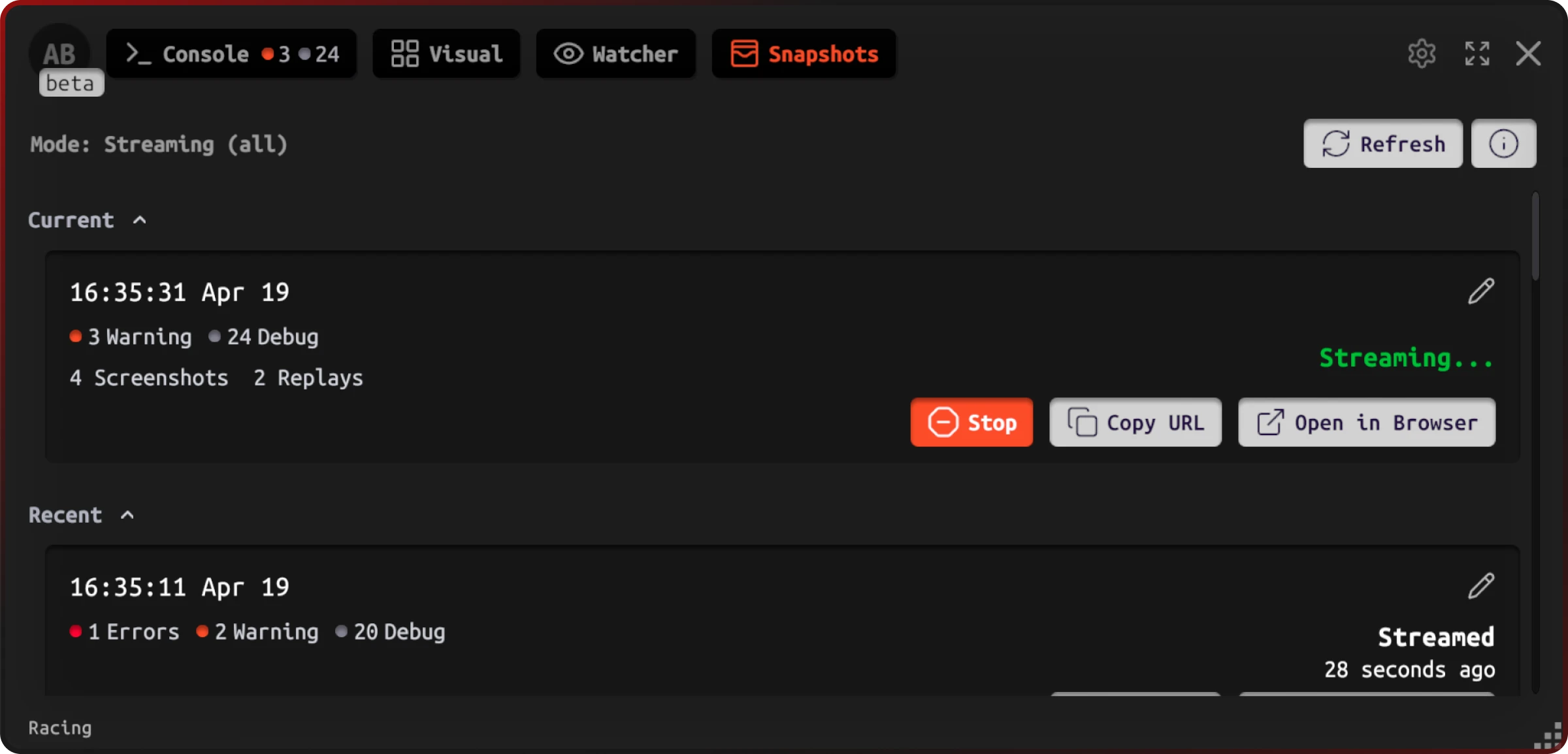
When QA can trigger a session snapshot at the moment of failure, you collapse the usual gaps: device and OS, log history, screenshots, build identity, and optional custom game state your team wires into watchers — into one shareable artifact. The goal isn't magic; it's to shrink the "insufficient information" bucket that studies flag as a large share of non-reproducible reports.
In Jahro's Unity client, snapshot modes (including streaming-oriented options) surface session status and links without leaving the build — useful when QA is mid-test and can't context-switch to a desktop.
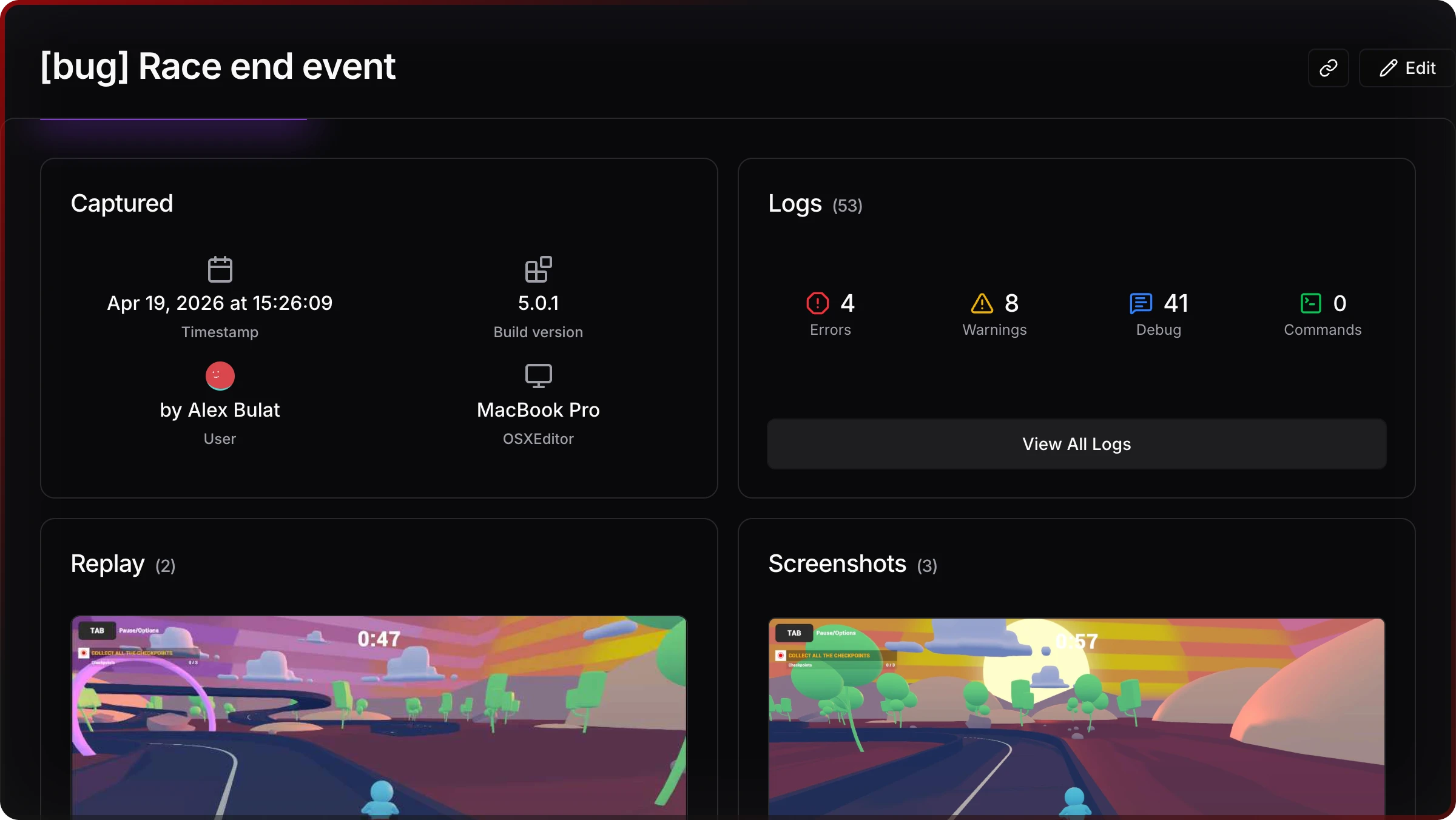
On the web side, a snapshot aggregates what happened (log mix, time) and where (device class, user), so triage starts from data instead of Slack threads.
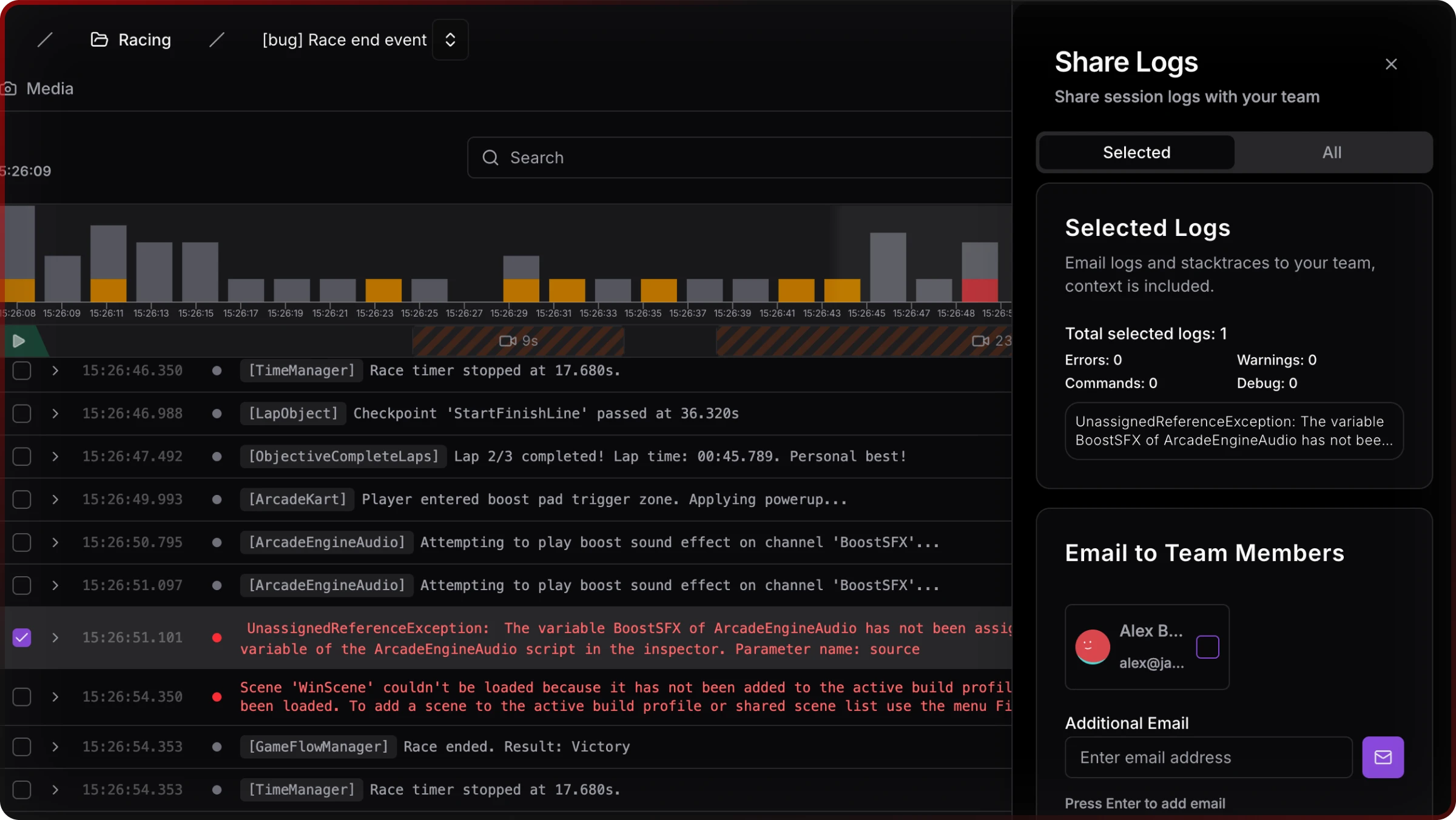
Sharing stays a first-class action — link copy, email to teammates — which matters when producers or remote staff need the same view.
Mapping back to the earlier categories:
| Failure category | What tends to be missing manually | What a full snapshot is designed to carry |
|---|---|---|
| Hardware / GPU | Model, GPU, resolution | Device-oriented metadata |
| OS | Exact OS / API level | OS version string |
| Race / timing | Ordered events before crash | Session log history |
| Save / state | Progression, flags | Watchers / custom variables (when integrated) |
| Build | Dev vs release, backend | Build / config metadata |
| Memory | RAM, warnings | Logs and device memory signals where captured |
| Network | Connectivity | Network-related context at capture time |
| Insufficient report | Everything above | Bundled artifact instead of ad hoc fields |
Good tooling compresses rounds of questions into one inspectable object.
Building a cleaner QA → developer pipeline
Process still matters. Snapshots don't replace triage ownership, severity rules, or release gates.
Standardize when QA triggers capture — for example on first error-class symptom, not only on hard crashes — so logs aren't lost after repro attempts. Align build naming in tickets with the identifiers your snapshot stores. Route links through Jira, Linear, or GitHub Issues the same way you would attach a log zip.
Cost awareness: engineering productivity literature and vendor reports often quote large fractions of time spent debugging and fixing; IBM-style phase cost curves are widely repeated (cheap in design, expensive in production). Those numbers are illustrative for budgeting — your studio should still measure ticket age and reopen rate on "cannot reproduce" classes.
Treat capture as part of definition of done for QA builds, not a side experiment.
If you only change three things this sprint
First, require OS + device + build on every mobile ticket — no exceptions. Second, assume logs won't arrive unless your process makes them automatic for QA. Third, separate race hunting from step-and-repeat reproduction — sequence evidence first.
If you want to try Jahro alongside those habits, the getting started path is short: Unity package, API key, enable snapshots for internal QA builds. The Unity snapshots documentation covers capture modes and lifecycle. Free tiers exist for solo developers; teams scale from there.
You fix non-reproducibility by narrowing uncertainty — with process, evidence, and tools that match how QA actually works.
FAQ
Why can my QA tester reproduce a bug but I can't?
Different hardware, OS, save state, memory conditions, and often build targets separate your desk from theirs. Get environment parity and ordered logs; guessing wastes both sides' time.
How do I get full context from a QA bug report in Unity?
Ask for structured fields, then obtain logs via ADB or Xcode, or use in-build capture so QA doesn't act as a log extraction service.
What's the best Unity bug report template for mobile QA?
Include device, OS, build, steps, expectation, frequency, network — and assume logs are the weak point unless you automate them.
Can I reproduce race condition bugs in Unity?
Not reliably by repeating steps. Use log ordering, profilers, and job safety tooling; session history helps you reason about timing.
Why does my Unity game crash on some devices but not others?
Typical causes: memory, GPU path, OS behavior, IL2CPP/stripping. Treat it as environment-specific until proven otherwise.
How do I debug a Unity crash that only happens on the user's device?
Use production crash reporting for live users; use session capture in QA so pre-release bugs carry evidence. Combine both rather than choosing one.
Sources and further reading
- Joorabchi, Mesbah, and Kruchten (2014). Works For Me! Characterizing Non-reproducible Bug Reports. MSR. ACM
- Masud et al. (2020). Why are Some Bugs Non-Reproducible? ICSME. Dal.ca PDF
- Mozilla Research Library — large-scale empirical study companion materials on non-reproducible bugs: Mozilla Foundation
- Shake — app bug statistics (practitioner-oriented survey figures)
- BrowserStack — Android fragmentation (market context)
- Google Testing Blog — Minimizing unreproducible bugs (process perspective)
Unity issue and discussion examples are cited inline above; Issue Tracker links for PlayerPrefs and pause/race cases appear in the research brief for readers who want primary sources.
Last updated: 2026-04-03. This guide is independent documentation; Jahro is one possible tool layer for capture and sharing.