How to View Unity iOS Logs Without Xcode
Unity on iOS does not give you a log file to open.
Debug.Loggoes through Apple's system logging. The supported ways to read that stream assume macOS and Xcode, which leaves Windows-first teams and QA in an awkward spot unless they add their own pipeline or use a dedicated tool.
If you ship Unity to iPhone or iPad, you will eventually search for unity ios logs without xcode because the Editor workflow does not carry over. This page is for Windows-first programmers, CI Macs, QA on iPhones, and anyone tired of explaining that Android-style log capture does not port to iOS for free.
The gap is not a checkbox you missed. iOS has no Player.log, and Xcode is Mac-only. For how iOS and Android options compare (ADB, Xcode, in-game consoles, crash reporting), see Unity debugging tools compared (2026).
Why there is no Player.log on iOS
On Windows, the desktop Editor, and Android, you chase a file: Player.log under %USERPROFILE%\AppData\LocalLow\[Company]\[Product] on Windows, ~/Library/Logs/Unity/Player.log in the Editor, or the Android paths in the manual. The Unity Manual on log files states plainly that iOS builds do not write that file. Debug.Log, warnings, and errors go through Apple's logging path instead of a path you can browse on the phone or pull over USB like a text file.
So where does it go? Unity pipes Debug.Log into Apple's logging infrastructure. In practice, that is the same stream Xcode's debugger console and Console.app subscribe to, and both need macOS. Apple does not ship a supported Windows viewer for it.
Development Build vs Release Build
A Development Build sends Debug.Log down the on-device path Apple documents for debugging; Xcode and Console.app are supposed to read it when everything lines up.
A Release Build drops the classic "attach Xcode and watch the console" story. Unity's docs say only Development Builds are debuggable in that attach-the-debugger sense. App Store binaries are Release; IL2CPP stack traces default to generated C++ unless you turn on stacktrace metadata (covered later).
Script Debugging adds symbols for stepping in Visual Studio or Rider. It does not give you a log viewer on the phone by itself.
No Player.log on disk, and Development vs Release changes what Apple's default tools can show you.
The "private" redaction problem (iOS 14+)
Even on a Mac, Console.app is often a bad fit for Unity strings. Apple's Unified Logging marks a lot of dynamic message text as private. People report Debug.Log lines as <private> instead of the real line. Unity tracks it: [iOS] Debug.Log() appears as <private> in Console app (Unity Issue Tracker). Behavior shifts by device and OS.
Launching from Xcode relaxes some Unified Logging privacy for that session. Full strings on the native path still mean a Mac-led workflow, not a cold TestFlight launch.
Console.app also streams the whole device: daemons, GPU, networking. You filter by process and subsystem and still hit <private> on dynamic strings.
Native tooling assumes an engineer at a keyboard with Xcode, not a distributed QA lab.
What Mac developers do (and what it costs)
The standard setup is in Unity's iOS testing and debugging guide: a Mac, Xcode from the App Store, an Apple Developer account, Developer Mode on the device, USB for trust. Plan on something like 8–12 steps before the first useful console line on a clean machine.
Two tools matter:
Xcode Debug Area console shows logs when you launched the build from Xcode in that session. If QA installed the same build from TestFlight or Apple Configurator and opened the app cold, you do not get that attached stream. On Unity Discussions, someone put it plainly: "In case developers aren't debugging the game (e.g: QA engineers play the game), there's no log output."
Console.app can stream device logs without an active Xcode run, but the device still lives in the Mac ecosystem, the stream is loud, and you fight process names, filters, and the <private> issue above.
Another thread on external QA notes that crashes caught in Xcode are not much help "when it comes to external QA" because QA is not running the debugger.
TestFlight, MDM, or side-loaded builds break the "I just hit Run in Xcode" story. A Mac in the office does not mean you can read logs from someone else's session on someone else's device.
Apple's happy path is same desk, same Xcode launch. Distributed QA is a different problem.
Wireless Xcode debugging does not fix remote teams
Xcode can pair a device over Wi‑Fi after USB pairing. That only removes the cable. It does not remove the Mac. The Mac running Xcode and the device must share a local network. If the tester is at home on TestFlight and the dev Mac is in the office, wireless debugging does not help.
"Wireless" means no USB. It does not mean "no Mac" or "works across sites."
What Windows developers cannot use (a short honest list)
Xcode, Console.app, and Apple's device pairing stack are macOS-only. There is no supported Windows port. That is Apple's rule, not something Unity can patch around.
Teams often hope one of these will help. They usually do not:
- iTunes on Windows — sync and backups, not a live unified log viewer for Unity.
- iMazing / similar — file and backup tooling, not a substitute for streaming
Debug.Logfrom a sandboxed app. - Unity Remote — Editor play-mode input and display, not log relay for installed builds.
ios-deploy(including Unity's fork) — aimed at macOS workflows, not a maintained Windows log story for production devices.- SSH — not on stock iOS.
You see the same pain in Unity Discussions searches: "Get Debug.Log output in the working iOS build", "No logs while not debugging through Xcode", "Do I still need a Mac to build to iOS XCode, if project was done on PC?" Old threads and new ones say the same thing. The constraint does not age out.
If your dev machine is Windows-only, Apple gives you no supported pipe from device log to your screen.
How cross-platform teams actually ship (and where logs get lost)
A common pattern: development on Windows, iOS compile on a shared Mac or CI (GitHub Actions macOS runners, Codemagic, Unity Build Automation, or a studio machine), distribution via TestFlight or internal installs, QA on phones that never touch that Mac. The Mac is a compile and signing gate; the people reproducing bugs are not in Xcode. Unity Support notes what everyone already practices: cloud Mac builders still sit on Apple's toolchain. They do not move Xcode to Windows.
A Windows developer investigating a bug often has the same project and branch and no idea what the iOS device printed during QA. Android at least offers adb logcat on any desktop if you accept the SDK, cables, and UNITY filters. iOS has nothing equivalent to "plug any PC into the phone and read the unified log" in the Apple-supported world.
That asymmetry shows up in long Unity Discussions threads on "Debugging builds on iOS" and "Cant see Debug Logs in XCode", including Mac owners who still get silence when the attach model does not match how QA runs the app.
The break is between build infrastructure and runtime observation. Unity does not ship a first-party cross-platform log viewer for iOS.
iOS Simulator vs real device (and why Simulator is not a Windows escape hatch)
Simulator is Mac-only (it ships with Xcode). It is not a Windows path to logs. Logs in Simulator often show in Xcode's console with less <private> friction than on hardware, but Simulator does not reproduce GPU drivers, memory pressure, thermals, or push the way devices do.
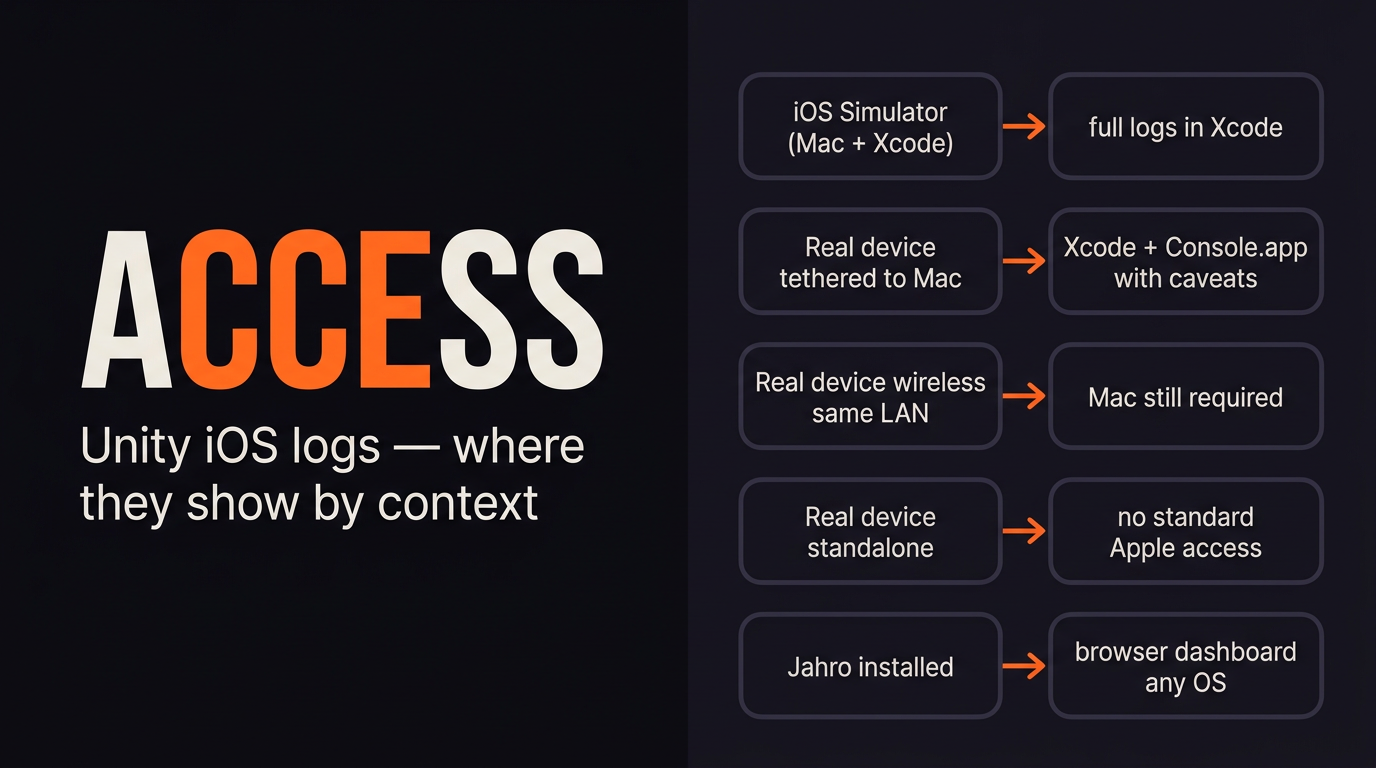
| Context | Apple toolchain | Windows / no Mac |
|---|---|---|
| Simulator | Xcode console | — |
| Device + USB / same-LAN wireless | Xcode; Console.app (caveats) | — |
| Device standalone (TestFlight, field) | No PC stream | No PC stream |
| In-app / networked capture (e.g. Jahro) | Web dashboard | Web dashboard |
Simulator is a Mac-only partial stand-in for hardware. It is not a cross-OS workaround.
Alternatives before you standardize on one vendor
Roll your own with Application.logMessageReceived
Unity documents Application.logMessageReceived for capturing Debug.Log, warnings, errors, and exceptions on the main thread. Use logMessageReceivedThreaded if worker threads log and you need those lines. A minimal pattern:
void OnEnable() {
    Application.logMessageReceived += HandleLog;
}

void OnDisable() {
    Application.logMessageReceived -= HandleLog;
}

void HandleLog(string logString, string stackTrace, LogType type) {
    // POST to your API — queue when offline, batch if needed
}
You own auth, PII in strings, retention, and uptime. Many teams prototype once and never ship the dashboard.
Write to Application.persistentDataPath
Append to a file under the sandbox (often in the same HandleLog handler):
void HandleLog(string logString, string stackTrace, LogType type) {
    var line = $"[{type}] {logString}\n{stackTrace}\n";
    System.IO.File.AppendAllText(
        System.IO.Path.Combine(Application.persistentDataPath, "game.log"), line);
}
Getting the file off the device means File Sharing entitlements, tester discipline, or in-game export. It is not a live shared view for a developer on another OS.
Crash and log aggregators (Sentry, Crashlytics, Bugfender, Loggly, …)
Sentry and Crashlytics are strong for crashes and errors in the wild. That is not the same as a live QA console during a repro. Log SaaS brings volume pricing and SDK weight. All of that helps fleet observability; none of it automatically solves "QA on TestFlight, engineer on Windows, need the last two minutes."
In-Asset-Store consoles (SRDebugger, Lunar Console, …)
SRDebugger, Lunar Console, and similar tools are great for on-device visibility: the person holding the phone sees logs without Xcode. They are weaker by default at remote handoff (browser on Windows, shareable URLs, team permissions). Jahro targets that collaboration layer. Pick based on whether you are blocked on local iteration or on distributed QA.
DIY capture, crash analytics, local overlays, and team dashboards solve different slices. Mix based on whether you need live cross-OS sharing, not only text on glass.
The QA gap (why bug reports arrive without logs)
QA files screenshots and steps. Logs rarely come along because iOS does not expose Unity's stream to a TestFlight install. Unity Discussions: when nobody attaches through Xcode, there is no log output on the usual path; crashes caught only under the Xcode debugger are not useful for external QA. Your process assumes installed builds; Apple's tooling assumes an Xcode launch.
Android teams can sometimes coordinate adb. iOS has no symmetric "email the unified log" story without extra tooling.
Under-specified reports follow from hidden signals more often than from bad intent.
Where Jahro fits (after you understand the constraints)
Jahro is a Unity debugging platform for mobile: an in-game console plus a web dashboard in any browser. On iOS it captures Debug.Log inside the app and syncs sessions your team can open on any OS. The machine that reads logs does not need Xcode.
You still use a Mac to build and sign the .ipa. Jahro covers observation and handoff when the build runs from TestFlight or the field without an Xcode session. QA opens the console, filters log types, and can create a snapshot (logs, device context, optional screenshot) with a shareable link. Details: Unity logs.
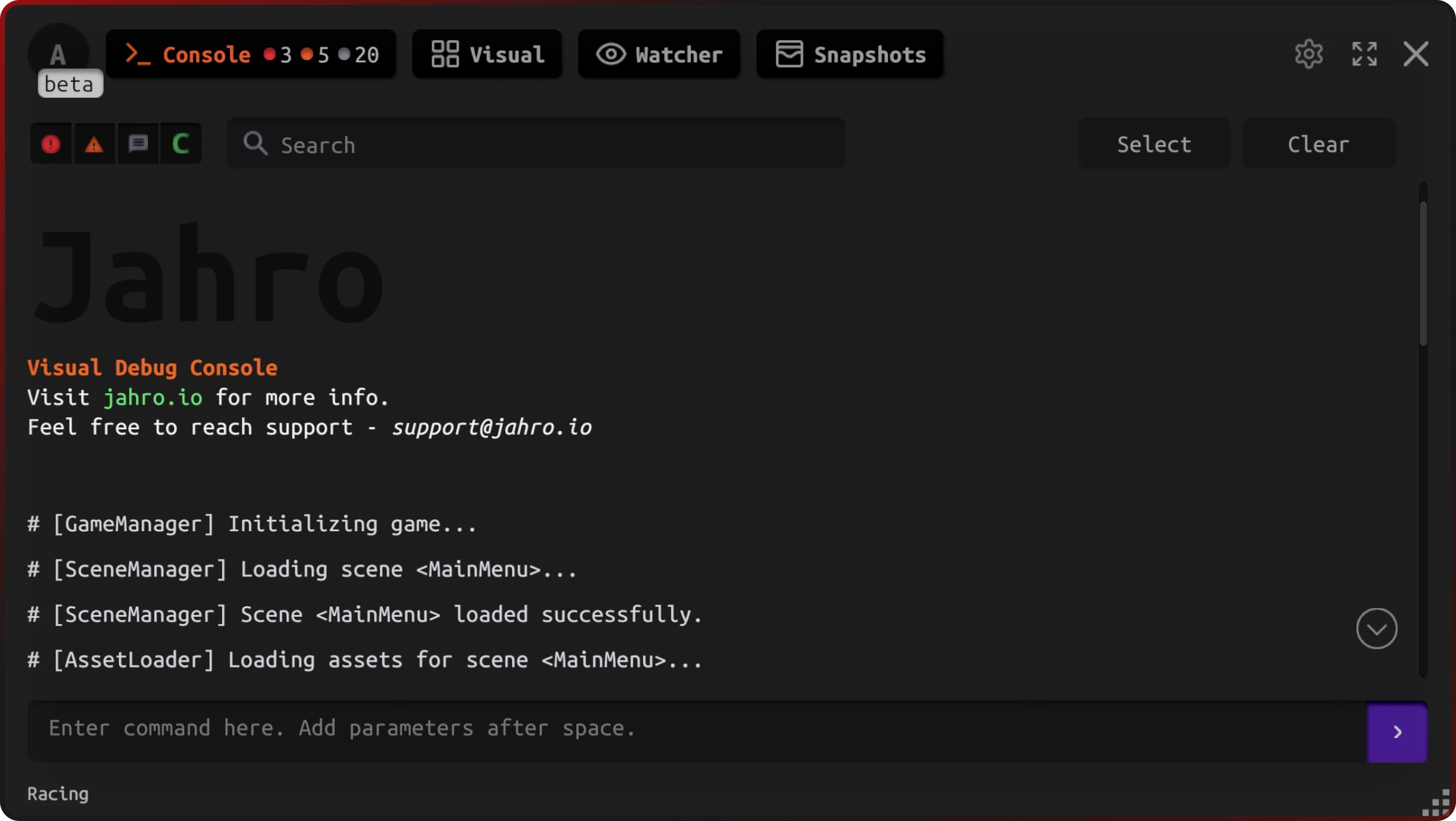
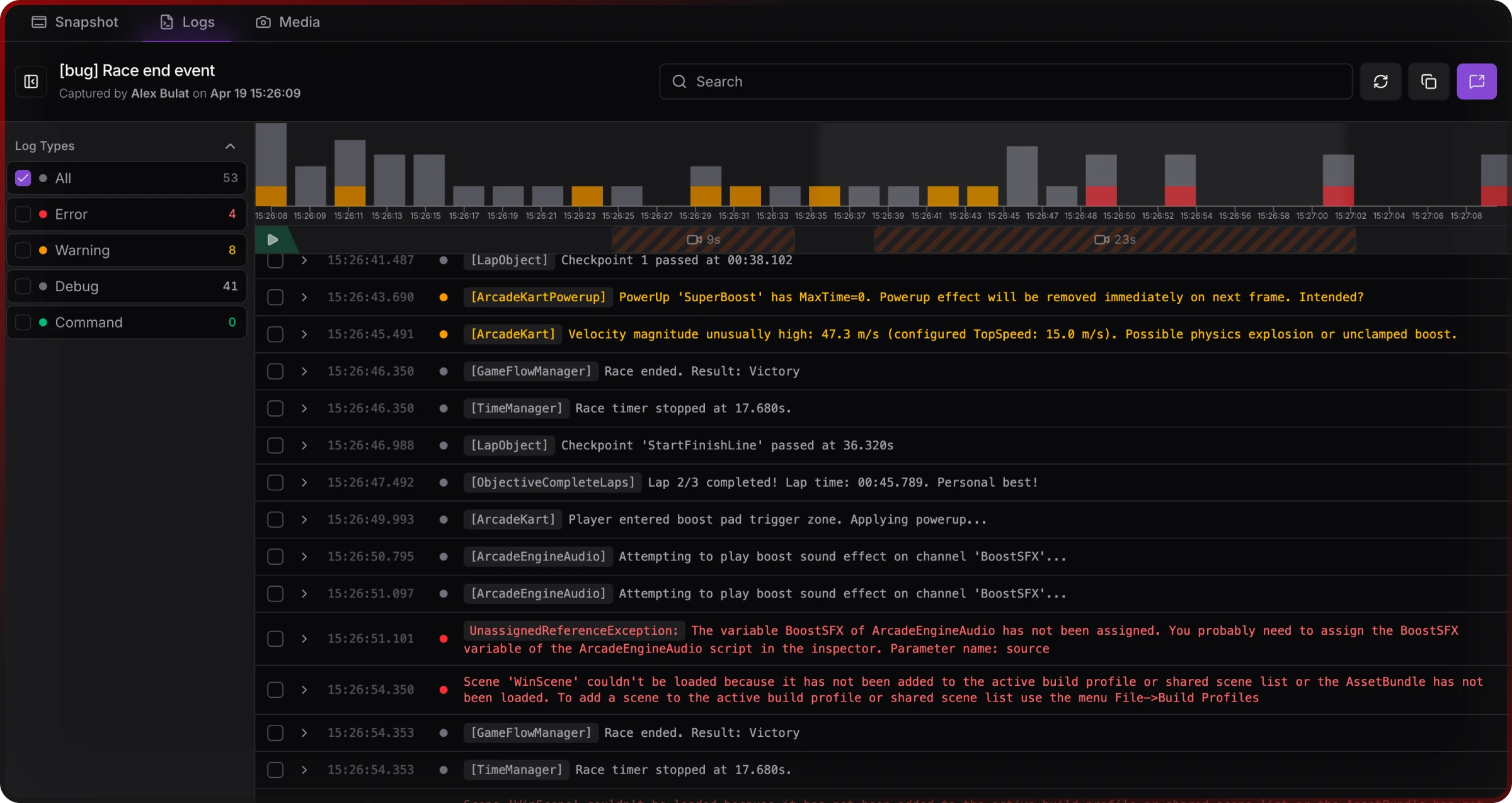
Limits: Cloud features need network. Jahro complements production crash services (Sentry, Crashlytics) for fleet-wide post-hoc analytics; it does not replace them. Offline-only sessions need file logging or a local overlay.
Jahro removes Xcode from the log-reading step. It does not remove signing the IPA.
IL2CPP, stripping, and readable stack traces on iOS
All iOS players use IL2CPP. Default exception stacks often show generated C++ unless you set IL2CPP Stacktrace Information to Method Name, File Name, and Line Number (Player Settings → iOS → Other Settings → Configuration). You trade size and build time for readable C# frames.
Managed Stripping can remove logging hooks unless you preserve them with link.xml or [Preserve]. That applies to DIY loggers and third-party SDKs.
Development vs Release: Xcode attach debugging targets Development builds; App Store Release does not stream logs through Xcode the same way. Production leans on crash reporters and/or in-game tools.
Tune stripping and stacktrace settings before you decide a logging approach is "broken" in a minimal Release build.
Quick setup outline (Jahro on iOS)
Exact steps are in Getting Started and Unity logs documentation. Roughly:
- Create a Jahro project and API key in the web console.
- Add the Unity package (Package Manager git URL or
.tgzper docs). - Enter the API key in Tools → Jahro Settings and add the Jahro prefab or initializer to your first scene.
- Build to iOS from your Mac pipeline as usual; install on device via Xcode, TestFlight, or internal distribution.
- Open the Jahro dashboard in a browser on any machine; logs and snapshots appear under your project when the app runs.
You keep your existing iOS build chain. You add observability that does not require the tester to own Xcode.
FAQ
Can I debug a Unity iOS game without a Mac?
You cannot sign and compile iOS player builds without Apple's toolchain on macOS somewhere. You can inspect logs and share sessions from devices without every engineer running Xcode. That is what remote-friendly Unity tooling is for.
How do QA testers access iOS logs without Xcode?
Apple does not expose a Windows-friendly log stream. QA either uses a Mac-side workflow (uncommon for pure QA) or an in-game log and capture tool that runs on the device.
Does Jahro work with iOS Unity games?
Yes. Jahro supports IL2CPP iOS; configure the SDK per docs and use the web console for viewing and sharing.
Where does Unity write the player log on iOS?
There is no persistent Player.log path like on desktop. Logs go through system logging; Apple's tools on macOS are the default read path unless you add your own capture.
Does Unity wireless debugging on iOS still require a Mac?
Yes. Wireless replaces USB after pairing. It does not enable log viewing from Windows or from another continent.
Why do my logs show <private> in Console.app?
Unified Logging privacy can redact dynamic strings. Launching from Xcode mitigates that for a session. Otherwise use a capture path that does not rely on Console.app, or watch Unity's issue tracker for device-specific behavior.