ADB Logcat vs Jahro for Unity Mobile Debugging
If you have ever run adb logcat on a live Android build, you already know the problem: the lines you need are in there somewhere, but they sit under a firehose of system noise. Here is what ADB actually is, how to stand it up for Unity from scratch, where it still wins, and where it fights real studio workflows (QA, remote testers, iOS). Jahro is one option for teams that want in-game logs and shareable sessions without cable gymnastics; it is not the only kind of tool, and ADB is not wrong for every situation.
The real fork is not "which tool is more powerful" but who can capture logs, on which OS, with how much setup, and how much noise you are willing to read.
What ADB and logcat are (in one minute)
ADB (Android Debug Bridge) is Google's command-line bridge to a device or emulator. Logcat is the Android logging buffer: your Unity player, the OS, ads, sensors, and background services all write into one stream. Unity messages are usually tagged (for example Unity), but the platform does not hand you "only my game" unless you filter hard.
Official references: Android Debug Bridge and Logcat command-line tool. Unity ties this workflow to development builds and device debugging; see Debug on Android devices.
ADB logcat is the default, low-level way to read Android device logs. It was never meant to be Unity-aware.
The full setup path (USB) — why "just run logcat" is never one step
From a clean Mac or PC and a fresh phone, expect on the order of twelve separate steps before you have a filtered Unity stream you can actually use. None of them are conceptually hard; together they are where onboarding friction lives.
Machine: SDK and PATH. Install Android Studio or download platform-tools alone. Find the platform-tools folder (for example ~/Library/Android/sdk/platform-tools on macOS or %LOCALAPPDATA%\Android\Sdk\platform-tools on Windows). Add it to your PATH so adb works in any terminal — on Windows via System Properties → Environment Variables; on macOS/Linux via ~/.zshrc or ~/.bash_profile. Check with adb version.
Device: developer mode and authorization. On the phone, open Settings → About phone, tap Build number seven times, then enable USB debugging under Developer options. Connect USB, accept the fingerprint prompt ("Always allow" saves repeats), and run adb devices. You want device, not unauthorized. If you dismissed the dialog, you will chase ghosts.
Logcat: tame the firehose. Raw adb logcat dumps the entire OS. Hundreds of lines per second is normal. For Unity you usually narrow the stream, for example:
adb logcat -s Unityor:
adb logcat Unity:D *:SSome teams pipe through grep for multiple tags. Optional quality-of-life: adb logcat -c to clear the buffer before a repro, or redirect to a file for later.
On Windows, OEM USB drivers (Samsung, Google, and so on) are a common extra step before adb devices sees the phone at all.
Budget real time for first-time setup. The commands are short; PATH, drivers, and device authorization are not.
Wireless ADB (Android 11+) — "no cable" still starts with a cable
Google's wireless debugging flow usually pairs over USB first, then moves to IP and ports. Typical steps: enable Wireless debugging in Developer options, pair with a code (adb pair ip:port), then connect (adb connect ip:port). Pain points people actually hit: corporate Wi-Fi blocking peer connections, DHCP changing the device IP (session dies until you reconnect), and flaky mDNS on some routers.
Wireless saves unplugging. It does not remove adb, authorization, or network luck, and it can fail in studios where Wi-Fi is locked down.
Noise, missing lines, and things that break mid-session
Volume and relevance
Developers describe logcat as overwhelming even after filtering. On Unity Discussions, one person wrote: "The sheer volume of text… even when filtering by error priority, there are so many lines and they mean so little to me." Another thread notes that after moving to Gradle, adb logcat -s unity became unreadable. Unity 6 discussions call out per-frame native spam that drowns out what you care about — "It tracks every single action PER FRAME…" The Unity Android Logcat package exists partly because raw output is hard to use in day-to-day debugging.
"Filtered" is not the same as readable. OS and engine chatter still competes with your Debug.Log lines.
When Debug.Log seems absent
Forum history includes repeated threads where Debug.Log does not appear in logcat despite a connected device — often tag filters, script stripping, or build type (Unity documents that full script logging expectations tie to Development Build for typical workflows). That mismatch burns time.
Connection and tooling reliability
Common issues: empty adb devices lists, unauthorized state, the adb server wedging until adb kill-server / adb start-server, and truncated stack traces in noisy streams. Unity's Android troubleshooting docs reference tooling that gives little feedback when something fails, which matches the "New to Logcat. Where do I start with all this info?" thread on Unity Discussions.
ADB is stable enough to be universal. Your afternoon is not guaranteed to be.
Who pays the cost — time and team structure
Industry surveys and practitioner posts often put something like a third to half of developer time on debugging-adjacent work. Treat any single number as directional, not a lab result. The point is simpler: friction in capture and triage burns the same budget as hard bugs.
ADB's price is often paid in calendar time, not license dollars.
When ADB logcat is still the right tool
Fair comparisons rank. ADB is the right default when:
- You are solo, on Android, on your own machine, and you live in a terminal or Android Studio's Logcat window.
- You need deep system context: native crashes, JNI, ANRs, low-level ART messages — where the full OS log matters.
- You are profiling behaviors where scheduler, memory pressure, or platform signals outside Unity's C# layer are the hypothesis.
- The bug is Android-platform level, not "our gameplay state machine is wrong."
- You need something before the build is stable enough to integrate third-party SDKs.
ADB is free and everywhere. For infrequent Android-only debugging, the overhead can be acceptable.
Keep ADB in your toolbox even if you add layers above it.
Where ADB breaks down for studios (even when it works on your desk)
QA and the USB boundary
ADB expects the device attached to the machine running adb. A QA tester's phone is not on your USB cable. Their practical options: walk over and plug in, reproduce on your hardware (may not happen), or file from memory. There is no native "share this session" URL in the adb workflow.
Distributed QA and ADB do not line up structurally.
Remote and async testing
Outsourced or remote QA magnifies the same constraint. You cannot run adb logcat against a tester's handset on another continent without remote device farms or shipping hardware.
iOS
ADB does not exist for iOS. Apple expects Xcode on a Mac, signing, and tools like Console or Instruments for device logs — a separate workflow from Android. Cross-platform Unity teams therefore carry two debugging paths unless they standardize on something that spans both.
Publisher and partner builds
External reviewers running your binary on their hardware rarely grant you adb access. If something fails during review, you may have no log at all unless you planned capture in the build.
Parallel devices
Five QA devices means five cables, five terminals, or manual file shuffling. Aggregation is DIY.
Non-engineers
Producers and PMs generally do not maintain adb. There is no web dashboard in stock adb; access is terminal-shaped.
ADB optimizes for one developer, one cable, one Android — not for team evidence.
Jahro in this landscape (what changes)
Jahro is a Unity-integrated debugging layer: in-game console, logs, commands, and snapshots that open in a web console and can be shared with a team. It goes after the same problems: noise, access, iOS and Android parity, and QA-friendly capture.
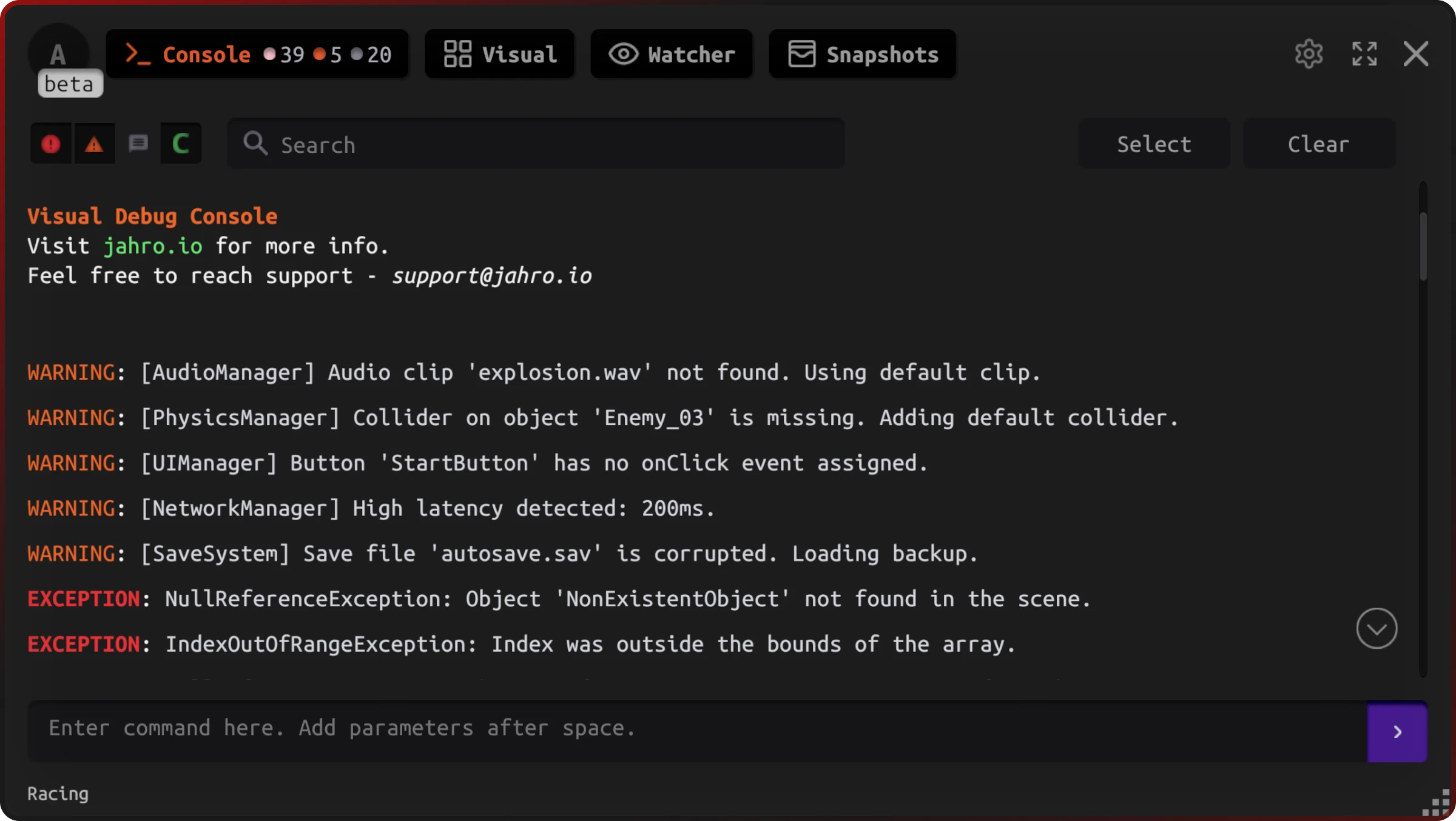
After you integrate the SDK, you can filter log types in the on-device console instead of grepping OS-wide output — for example focusing errors and warnings during a repro.
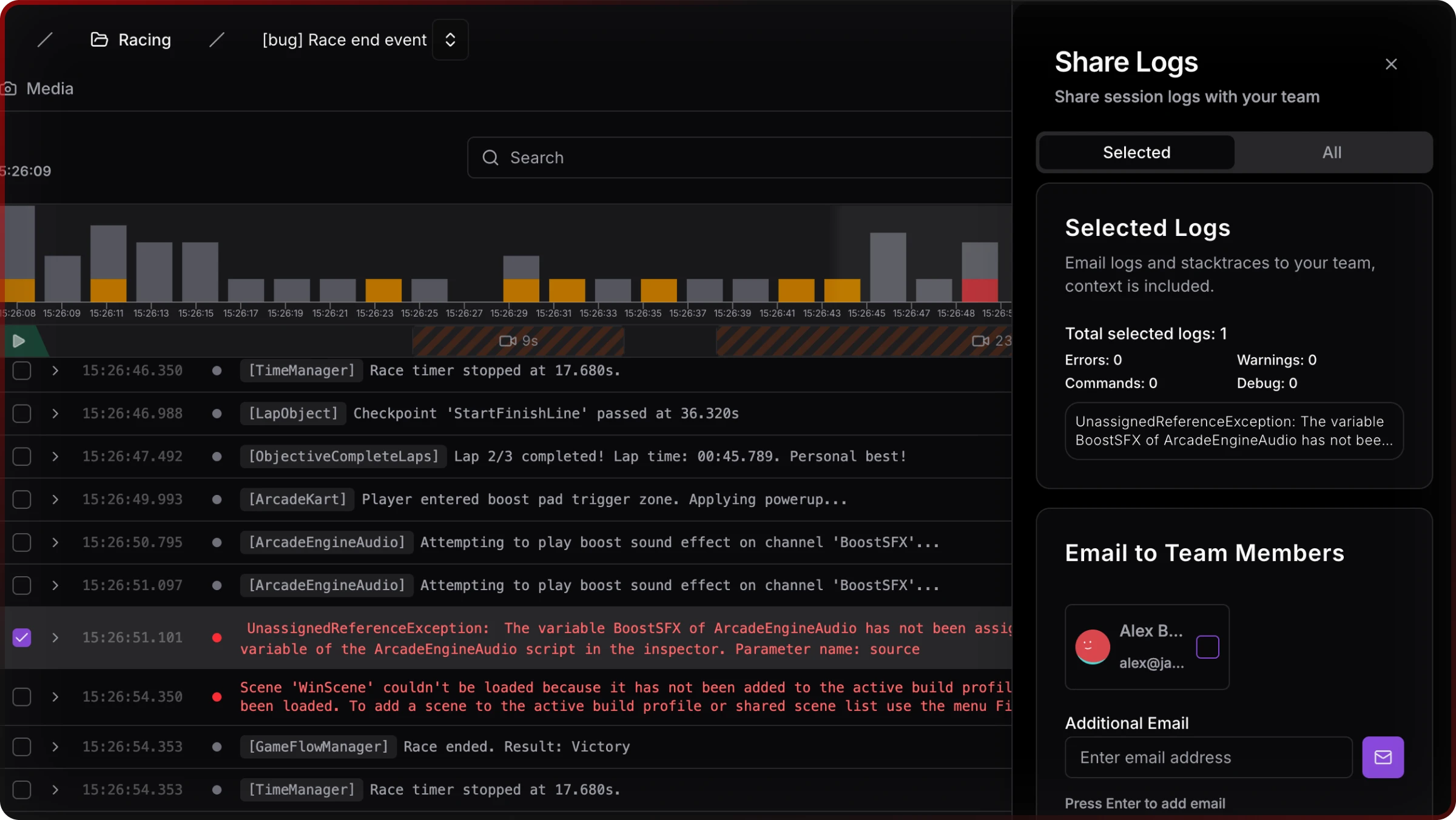
For collaboration, sessions can be shared from the web app (session links and email to team members), which fills the gap where adb has no shareable link.
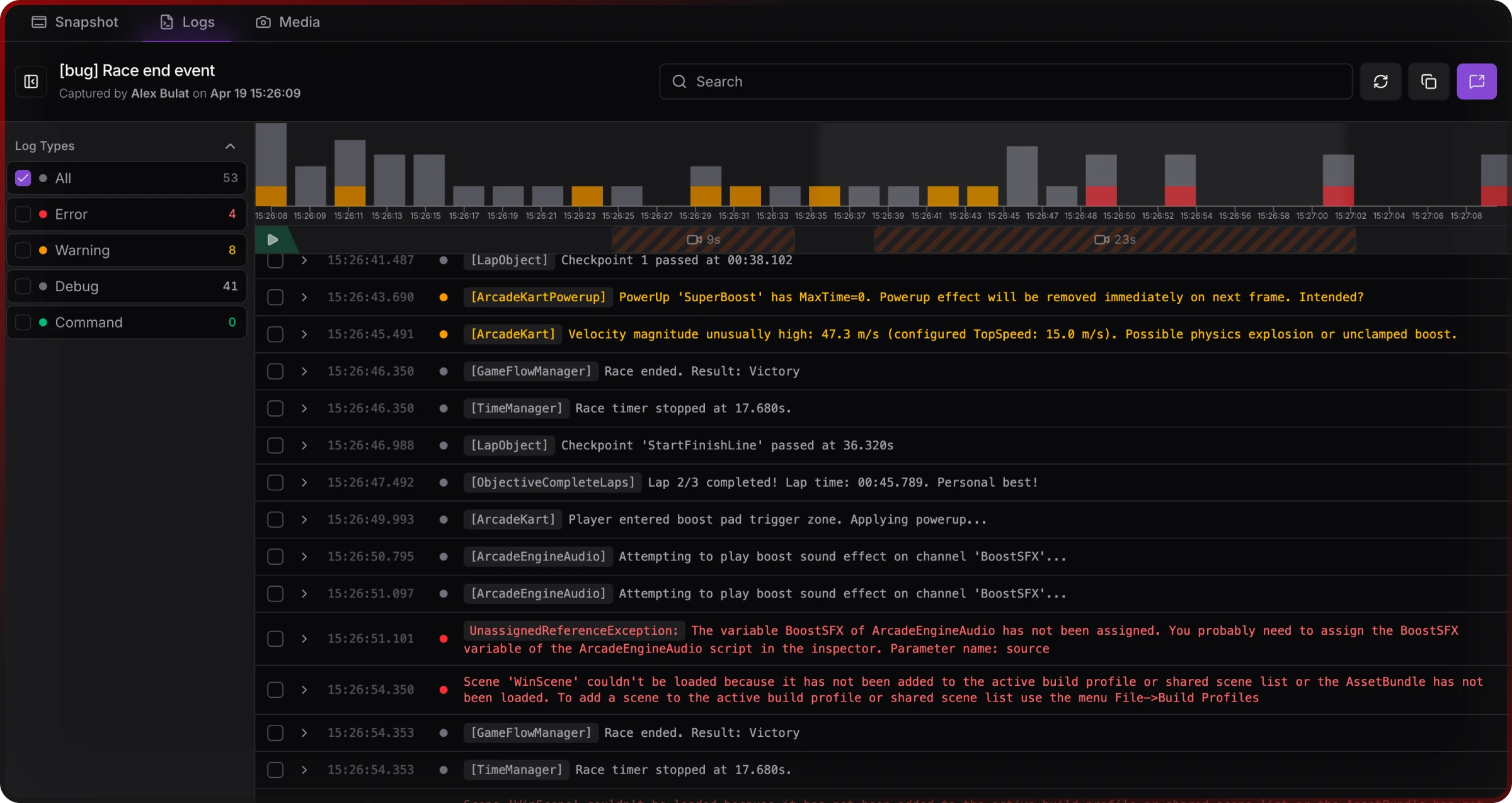
The logs viewer in the dashboard supports filters, search, and selection when you are triaging what QA uploaded or what streamed from a session.
Honest limits: Jahro is a paid product with integration work. It is not a zero-line substitute for "I only need adb once." It also does not replace native crash tooling when the investigation belongs in lldb, ndk-stack, or Play's vitals — same reason keeping ADB around can still make sense.
Jahro trades adb's zero-dollar license for shared, game-shaped context across roles and platforms, when that is worth the subscription to your studio.
Side-by-side snapshot
| Dimension | ADB logcat (typical) | Jahro (typical) |
|---|---|---|
| Setup on new machine + device | Many steps (SDK/PATH/dev mode/USB) — on the order of ~12 for USB; more for wireless pairing | Minutes to hours once — package + API key + build |
| Cable / developer mode | Expected for classic adb workflows; wireless has its own fragility | Designed around in-build UX; no adb requirement for testers |
| iOS | No | Yes (same product direction as Android) |
| Unity-focused filtering | Manual tags / grep | Built-in log categories and search |
| Shareable session link | No | Yes (web console / sharing) |
| QA self-serve | Generally no (needs dev machine) | Yes (capture from the build) |
| Remote/async | Poor fit | Designed for async handoff |
| Raw OS / native diagnosis | Strong | Use Jahro for game workflow; keep native tools for edge cases |
| Cost | Free | Paid (subscription) |
| Development vs release builds | Unity script logging expectations often center on Development Build for full fidelity | Jahro is positioned for team workflows across internal and test builds; follow lifecycle docs for production safety |
Use the table as a decision aid, not a verdict. Your constraint might be "cheapest possible solo Android," and that is valid.
Other options you might already know
The Unity Android Logcat package is the usual step up from a terminal: Editor UI, stack traces, package filters — still Android-first and USB/editor-centric. Other tools (Proxima Inspector, Bugfender, UnityIngameDebugConsole, Flipper) trade cost, Unity focus, and remote access differently; none is a full answer to team plus iOS plus shareable sessions by itself.
You can land between raw adb and a full platform. The comparison above is about where Jahro sits, not about pretending alternatives do not exist.
When to choose what
Stay on ADB if you are an Android-focused solo dev, you need maximum native visibility, and collaboration is rare.
Add a Unity-centric layer when QA, remote testers, iOS, or shareable sessions keep showing up in retros as recurring costs — or when noise and setup time are eating the debugging budget that those survey numbers keep pointing at.
If you want to try Jahro's path, start with Getting started and the Unity logs / snapshots docs; pricing is public on /pricing.
Pick based on team shape and platforms, not slogans.
Related guide
How to view Unity logs on Android without ADB — step-by-step options when QA cannot use adb.
FAQ
Is ADB good enough for Unity debugging?
Often yes for solo Android work. It struggles when multiple roles, iOS, or sharing enter the picture — then workflow cost dominates.
When should I use ADB vs a dedicated tool like Jahro?
Use ADB for native/system-level Android investigation. Use Jahro (or similar) when you need game-shaped logs, cross-platform parity, or QA-friendly capture with web review.
Does ADB work on iOS?
No. iOS uses Xcode-family tooling on a Mac. Plan for two workflows or one tool that covers both mobile targets.
Can my QA testers use Jahro without a technical setup?
In the standard setup they interact with the in-game console and capture; they do not need adb or USB debugging to contribute useful logs.
Do I need to keep ADB installed if I use Jahro?
Many teams do — for occasional low-level Android diagnosis. Jahro and ADB can coexist.
How hard is it to set up ADB for Unity debugging?
Expect on the order of a dozen steps on a clean setup plus filters; wireless adds steps and Wi-Fi variability.
Sources and further reading
- Unity Manual — Debug on Android devices
- Unity Manual — Android Logcat package
- Android Developer — adb
- Android Developer — logcat
- Unity Manual — Test and debug an iOS application
- Unity Discussions — Crashing on Android, new to Logcat
- Unity Discussions — Logcat doesn't show Unity Debug.Log() outputs
- Unity Discussions — Unity 6 Native Android Debugs
- GitHub — UnityIngameDebugConsole
This comparison is independent documentation. Figures about developer time on debugging come from industry summaries and should be read as directional, not precise.