SRDebugger vs Jahro — Unity Runtime Debugging Compared
SRDebugger is a Unity Asset Store package that puts a runtime console, options/cheats, profiler, and bug reporter on the device. Jahro is a Unity Package Manager SDK plus web console: logs, snapshots, commands, and team access without tethering. If you are looking for an srdebugger alternative or comparing srdebugger vs jahro, start with who holds the device versus who can open a link, then dig into features, pricing, and migration.
SRDebugger optimizes for local, offline, on-screen debugging. Jahro optimizes for shared evidence and browser access when QA, publishers, or remote teammates need the same logs you see on the device.
What SRDebugger is (facts you can verify)
Stompy Robot’s SRDebugger has shipped since February 2015 (current listing: v1.13.1, January 2026; minimum Unity 2022.3.62 for that line). Docs live on stompyrobot.uk. People usually find it through Unity Asset Store search; the publisher does not run a separate marketing site with the same SEO footprint.
The runtime console hooks Application.logMessageReceivedThreaded, so existing Debug.Log calls work without rewrites. You get filters, search, stack traces, duplicate collapse, and a dockable overlay, all on the device. The Options tab exposes properties and methods through a partial SROptions class (categories, ranges, display names). A Bug Reporter can email reports via Stompy Robot’s hosted service using your Asset Store invoice–linked API key. A profiler tab shows approximate frame time and memory (not Unity Editor Profiler parity, but useful on-device). Full C# source ships with the asset.
SRDebugger is a mature, self-contained on-device toolkit with a fixed price and no mandatory cloud.
The split that matters: who is holding the phone?
Both tools can show Unity logs during play. The difference is where those logs live afterward.
SRDebugger keeps the stream on the hardware. If a QA tester in another building has the build, you do not see their console unless you ship logs another way (screenshots, video, exported text) or use the email bug reporter as a one-off handoff.
Jahro assumes networked sessions: the SDK can stream to console.jahro.io, where teammates open filters, snapshots, and share links. Published Jahro quotes line up with that: logs without emailing files (Oleksandr, Unity Developer); time spent pulling logs from a device cut from minutes to seconds (MINORUEATSLEGS, Lead Unity Developer). On Unity Discussions, tashuya1267 asked for alternatives to SRDebugger after years of use, worried it had not been updated in over two years and about compatibility with newer Unity. That thread is less about log rendering and more about team workflow and how often the asset ships updates.
If only you ever touch the device, SRDebugger’s design makes sense. If someone else plays the build, browser-accessible history stops being optional.
At-a-glance comparison
| Feature | SRDebugger | Jahro |
|---|---|---|
| Price | ~$30 one-time (Asset Store; sales happen) | Solo: free; Team/Enterprise: contact sales |
| Free tier | No | Yes — Solo (member/project/snapshot limits apply) |
| Install | Unity Asset Store | Unity Package Manager + API key |
| In-game log console | Yes — on-device only | Yes — device and web |
| Remote log access (browser) | No | Yes |
| Shareable log/snapshot links | No (email bug reports only) | Yes |
| Web dashboard | No | Yes (console.jahro.io) |
| Team collaboration / RBAC | No | Yes (Team plan) |
| Runtime commands | Options tab via SROptions | [JahroCommand] + dynamic registration |
| Built-in frame profiler | Yes (approximate) | No — use Unity Profiler / other tools |
| Bug reporting | Email via Stompy Robot service | Snapshots + dashboard |
| Source included | Yes (full C#) | SDK only (SaaS) |
| Offline / no internet | Works fully offline | Requires connectivity for cloud features |
| Data residency | On device | Cloud (EU, GDPR-oriented positioning) |
Use the table as a constraint checklist, not a scorecard. Profiler and offline rows favor SRDebugger; sharing and browser rows favor Jahro.
Where SRDebugger is genuinely stronger
One-time cost for solo use. Roughly $30 once versus any paid Jahro tier. If you never share logs and never outgrow Solo quotas, SRDebugger can still be cheaper long-term for a single developer who avoids subscriptions.
Ten-plus years in production. Lots of projects have shipped with it. A verified Asset Store review notes buying in 2015 and still using the asset in 2023 because updates continued (skriptsure). That longevity matters when you worry about abandoned dependencies.
Built-in profiler tab. Jahro does not ship an on-device frame-time/memory graph like SRDebugger’s profiler. For that, plan on Unity’s Profiler, Frame Debugger, or assets like Graphy alongside either tool.
Full source code. You can fork behavior, strip features, or audit every line. That matters for air-gapped setups or heavy customization. Jahro’s SDK is not open source.
No cloud or account requirement. SRDebugger runs entirely on the device. Jahro assumes a working internet path from the build to Jahro’s backend, which matters in labs that block third-party SaaS.
Unlimited projects under one license (typical Asset Store seat terms). Jahro Solo caps projects (research brief: 3); going past that nudges you toward Team.
Those strengths are real. Pretending SRDebugger is weak on price, profiler, and offline would be sales copy, not engineering.
Where SRDebugger strains (with sources)
On-device-only architecture. QA, publishers, and remote contractors often need logs without plugging the device into your laptop. SRDebugger does not offer a team dashboard or URL, only what is on screen plus optional email bug reports.
Bug reporter workflow. Reports go to email, not a shared triage queue with searchable history. You can implement IBugReporterHandler (from v1.12.1) to forward elsewhere, but that is custom work.
Release cadence concern. Version 1.12.1 shipped April 2022; 1.13.0 arrived January 2025, about three years between major lines. tashuya1267’s forum post (above) reflects compatibility anxiety during that gap. 1.13.x updates in 2025–2026 help, but the gap is on the public record.
Options registration style. Everything routes through SROptions rather than attributes on arbitrary types. Bigger codebases can pile up central boilerplate compared with scattering [JahroCommand] on existing classes.
Reported edge cases in reviews. One review mentions slow performance with many debug options (SunyerC, v1.12.1). Another describes a PIN entry UI issue on Android (rastleks); treat single-review hardware claims as unverified but worth testing on your targets. A harsh review alleges abandonment and forum silence (rastleks); the counter is that 1.13.x releases exist, so “abandoned” is stronger than the update log supports today.
The pain is less “bad console” than collaboration shape and email-era reporting.
What Jahro adds (when you already understand on-device consoles)
Jahro wraps the same class of Unity log stream but routes it through a project in the web console: filters, search, selection, and snapshots that bundle logs, screenshots, and device metadata. [JahroCommand] can sit on real methods; Text mode supports autocomplete and history; Visual mode targets QA-friendly controls. Watcher monitors fields without spamming Debug.Log. Production builds can auto-disable Jahro. SRDebugger has an experimental compile-time disable path you must wire deliberately.
Published Jahro users mention publisher playtests observed remotely (PHIST, CTO) and snapshots replacing fragmented evidence (Andre, Unity Developer). That matches the axis here: shared session truth, not just a prettier local overlay.
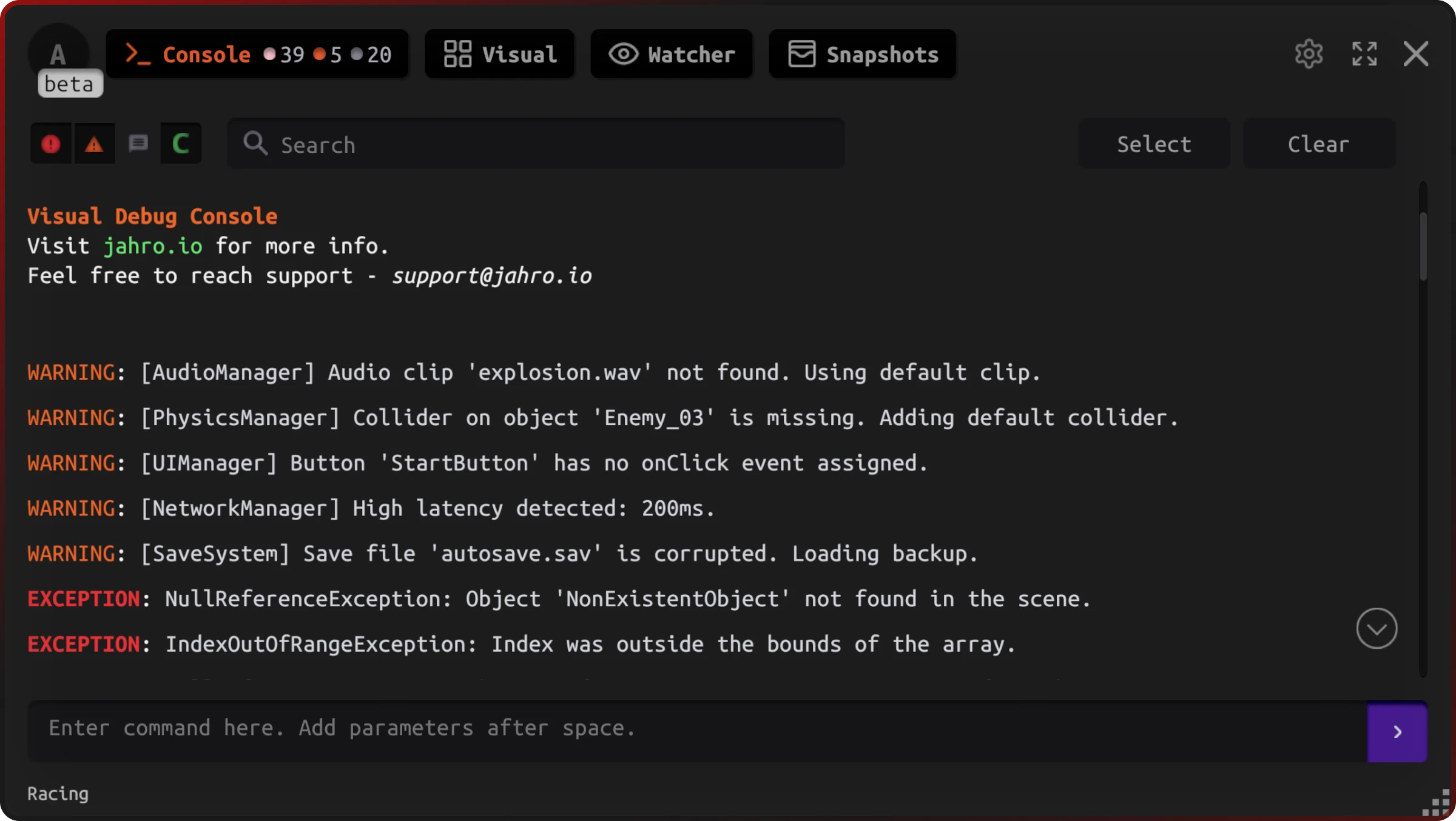
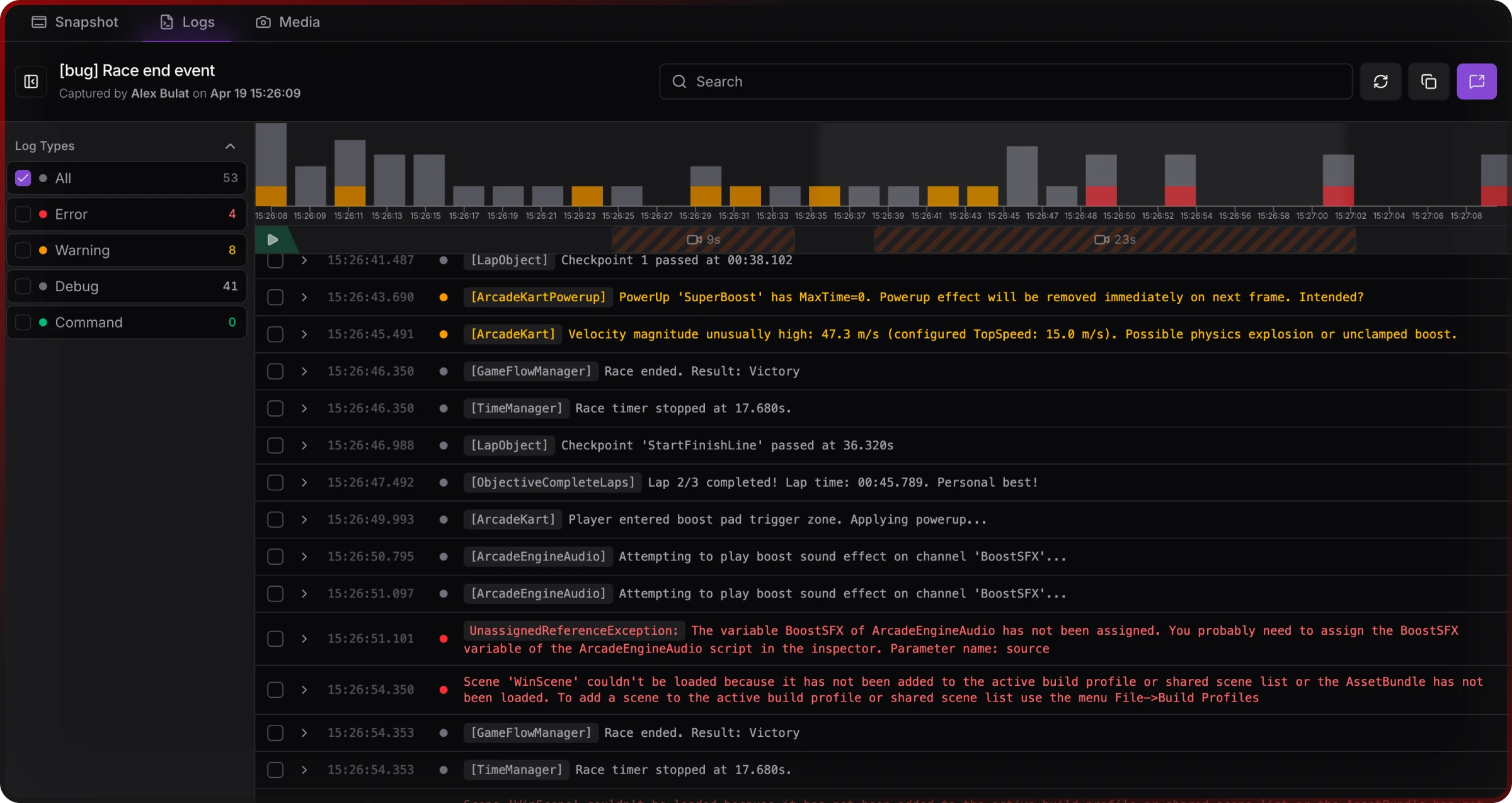
The web console is where “who holds the device” stops mattering for reading the session: filters and log tables load without ADB or Xcode on the viewer’s machine.
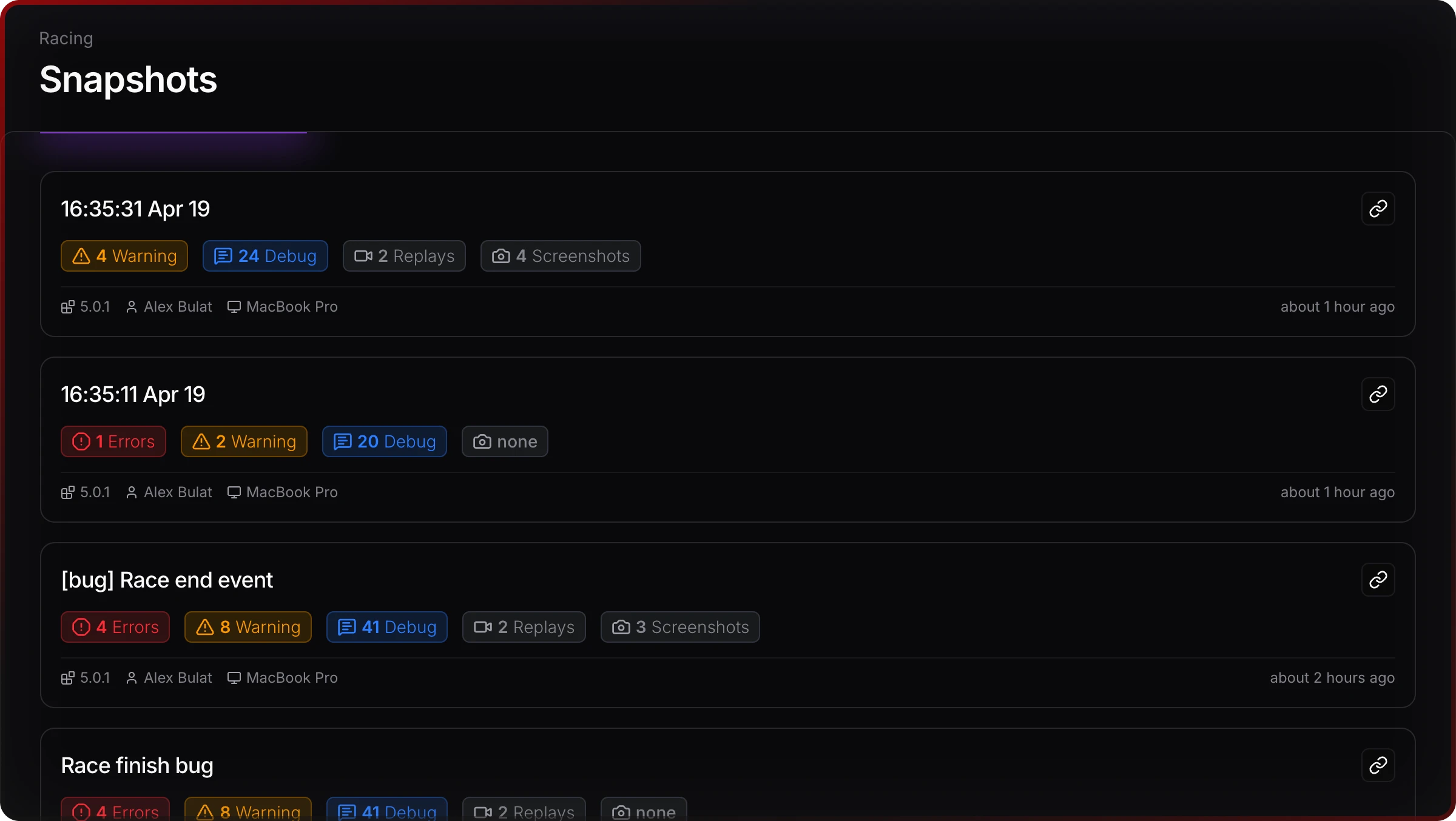
Snapshots give a durable artifact (history in the project) instead of an inbox thread per report.
Jahro bets on multiplayer debugging in the literal sense: roles, links, retention. It does not replace every offline capability SRDebugger offers.
Commands and cheats — different ergonomics
SRDebugger’s Options tab is powerful when you centralize tunables in SROptions: categories, ranges, pins on the game view, and OptionDefinition.Create() for dynamic entries. Jahro leans on attribute discovery and dual UI modes (text vs visual). Neither approach is automatically correct; the trade-off is a central partial class versus decentralized commands plus web-visible command output in snapshots.
Pick SRDebugger if you want all knobs in one file and zero cloud. Pick Jahro if commands should live next to domain code and be replayable from the web console.
Pricing and licensing (rough shapes)
| SRDebugger | Jahro Solo | Jahro Team (typical) | |
|---|---|---|---|
| Cost | ~$30 one-time | Free | Contact (yearly billing in positioning) |
| Team members | Single seat (Asset Store terms) | 1 | Unlimited |
| Projects | Unlimited under seat | 3 (per brief) | Unlimited |
| Snapshot retention | N/A | 30 days tier (check pricing page) | 90 days tier (check pricing page) |
Team pricing is not always a single public number. Use /pricing for current figures.
Solo vs $30 is a fair comparison. Team vs Asset Store needs your seat count and snapshot volume.
Migrating from SRDebugger toward Jahro
- Logs — Jahro also consumes standard Unity logging; you are not forced to rewrite every
Debug.Log. Remove explicitSRDebug.Init()if you added manual initialization. - Options → commands — Move entries from
SROptionsto[JahroCommand]on appropriate classes; large projects should budget part of a day or more. - Bug Reporter — Replace email-key workflow with Jahro snapshots and dashboard review; you may keep a separate crash pipeline (Firebase, etc.) as needed.
- Profiler — Keep Unity Profiler, Graphy, or SRDebugger’s own tab until you have a substitute you like. Jahro does not duplicate that graph.
- Ship — UPM install and API key setup are usually minutes; migration effort scales with how many SROptions you registered.
Migration is mostly command registration and reporting path work, not a rewrite of logging calls.
Related comparisons
- Lunar Console vs Jahro — another common free on-device log overlay path.
- ADB Logcat vs Jahro — when the pain is Android cable workflows rather than Asset Store consoles.
Same mobile Unity problem space; different legacy tool to leave behind.
FAQ
Is SRDebugger still worth buying in 2026?
Yes for solo, on-device, offline-friendly workflows where profiler and one-time price beat cloud collaboration. No if shared sessions or browser access are non-negotiable; those are not how SRDebugger is built.
What is the main difference between SRDebugger and Jahro?
Screen in hand versus session in the cloud. Commands, logs, and screenshots hang off that split.
Can I get Jahro free?
Jahro Solo is free without a credit card; quotas apply. SRDebugger is a paid Asset Store purchase unless you catch a sale.
Does Jahro replace SRDebugger’s Options tab?
Functionally for many teams, yes, with different registration and UI models. Validate edge commands you rely on in a test build.
Does SRDebugger work for team debugging?
Only indirectly: email reports or custom handlers, not a first-class team dashboard or link sharing.
Can Jahro replace Xcode for iOS logs?
It replaces needing a Mac on the desk of everyone who reads Unity logs for many workflows; it does not replace native Apple crash tools when the bug is outside Unity’s managed layer.
Which is better for a jam or tiny project?
SRDebugger if you want offline and profiler in one cheap bundle. Jahro Solo if you want zero upfront cost and might add QA later.
Related guide
Unity mobile game QA workflow for studio teams — how consoles and snapshots fit team process.
Sources and further reading
- SRDebugger — Unity Asset Store
- SRDebugger — Stompy Robot docs
- Unity Discussions — Any alternatives to SRDebugger?
- Jahro — Pricing
- Jahro — Getting started
Asset Store review quotes use reviewer handles and dates as in the research brief; forum and customer quotes name their sources. Performance and PIN issues are individual reports, not universal facts.