Standardize Unity debugging across projects — a studio buyer’s guide
Studio-grade Unity debugging is less about which Debug.Log wrapper you use and more about whether every project shares the same capture, review, and permission model. Mobile builds add friction: testers and developers rarely hold the same device, native log tools assume developer setups, and “cannot reproduce” tickets eat the calendar long after the sprint. This guide is for technical directors, QA leads, and engineering managers who want a checklist grounded in published research — not a landing page — before they standardize tooling across multiple Unity titles.
If you only need a personal overlay on one game, pick an in-game console and you are done. If you run two or more Unity projects, share QA across locations, or hand builds to external partners, the problem shifts: you are buying coordination infrastructure, not a faster local log tail.
Standardization is worth it when the same person does not have to re-explain “how we get logs here” for every new project and hire.
When studios actually evaluate tooling
Reviews are not random. They bunch up when the informal workflow snaps: a new project kickoff while the toolchain is still open; new QA headcount that cannot live on Slack screenshots; a production incident traced to a ticket that never had enough context; scaling from one team to several parallel titles; onboarding where seniors repeat the same debugging lecture; or an outsourcing contract that demands a documented handoff. Name your trigger and you keep the evaluation scoped — security-heavy for publisher-facing work, velocity-heavy for a milestone crunch.
Buy for the failure mode you just hit, then insist the short list prevents it next time.
What procurement asks (even at small studios)
Serious buyers keep circling the same topics. Security and data handling first: region, encryption, retention, and whether on-prem or dedicated cloud exists for publisher agreements. Access control needs roles (developer versus QA-only), per-project visibility, and fast revocation for contractors. Billing: per-seat versus per-project, annual invoicing versus cards, volume tiers. Support: ticket SLAs and whether larger accounts get a named contact. Integrations: Jira, Linear, or GitHub Issues, CI hooks, and whether the API supports automation.
2025 SaaS security reporting (summarized across vendors) describes a higher bar than a few years ago: most enterprises involve security before purchase, more than half raise security in the first sales conversation, and a large share of RFPs expect MFA or SSO in standard plans. SOC 2 Type II and ISO 27001 show up most when selling to regulated clients or large publishers; smaller studios may still read SOC 2 as a credibility signal rather than a hard gate.
If the vendor FAQ cannot answer where data lives and who can see it, the rest of the demo is noise.
The economic backdrop — debugging time and defect cost
Industry numbers vary by methodology but point the same way. Aggregator and vendor research on engineering time often cites roughly 35–50% of developer time going to debugging and validation; one line of industry commentary ties tens of billions of dollars a year in the U.S. alone to finding and fixing product defects. Treat the exact percentage as background, not a verdict — your studio’s pain is still salary times time lost to churn, not log viewer aesthetics.
The IBM Systems Sciences Institute cost-of-defect curve (repeated everywhere in software quality writing) frames escalation by phase: a defect caught late costs orders of magnitude more than one caught in design. For planning, use it as a priority argument — catching issues during QA beats patching live players — not as literal dollar tables per ticket.
Budget talks should start from hours returned to feature work, not from feature lists.
Non-reproducible bugs — the cited numbers
Peer-reviewed work on issue trackers puts a number on the coordination problem. Joorabchi et al. (“Works For Me! Characterizing Non-reproducible Bug Reports,” MSR 2014), analyzing tens of thousands of reports, found that about 17% of bug reports were non-reproducible on average, that those tickets stayed active about three times longer than others, and that 14% of non-reproducible failures involved insufficient information from the reporter. Later work in the reproducibility literature notes that many “fixed” non-reproducible reports were eventually reproduced — the failure was often documentation, not imagination.
That is why “ask QA to try again” is expensive at scale. If a slice of every sprint’s tickets is structurally harder to close, you are not arguing over a log viewer; you are arguing over whether first capture includes logs, device context, and session history.
Any workflow that cuts insufficient-information reports pays back in calendar time, not only morale.
An illustrative ROI sketch (with assumptions explicit)
Vendor-side models sometimes stack hours like this: take non-reproducible share from empirical studies, multiply by tickets per sprint, assign a few hours of combined QA and engineering time per bad ticket, and compare to annual software spend. The math is sensitive to assumptions — your tracker hygiene, time zones, and severity mix all move the result.
There is category-level evidence outside Unity-specific tools. Forrester’s Total Economic Impact study on TestRail (March 2025) attributes large three-year ROI to structured test management and faster defect resolution — a different product class than capture-and-share debugging, but the same direction: visibility and structured handoffs trim wasted hours. Jahro sits upstream of the tracker: it improves what you paste into Jira, not the tracker itself.
Use ROI models to compare scenarios, not to book finance-grade savings without your own telemetry.
Why value compounds with team size
For one developer, a console is personal speed. For a studio, the same capability becomes shared state: a log from a device nobody in engineering touched, reviewed in a browser without USB. Research on onboarding and internal tooling claims big gains when workflows are standardized — surveys report multi-month ramps to full productivity for new hires, and practitioner writing argues standardized tooling shortens tool-specific onboarding and cuts tribal knowledge. Treat those numbers as rough; the point stands: every repeated onboarding conversation you avoid is a sprint back.
The infographic below compresses a pattern from studio interviews and internal strategy work: coordination value rises faster than headcount.
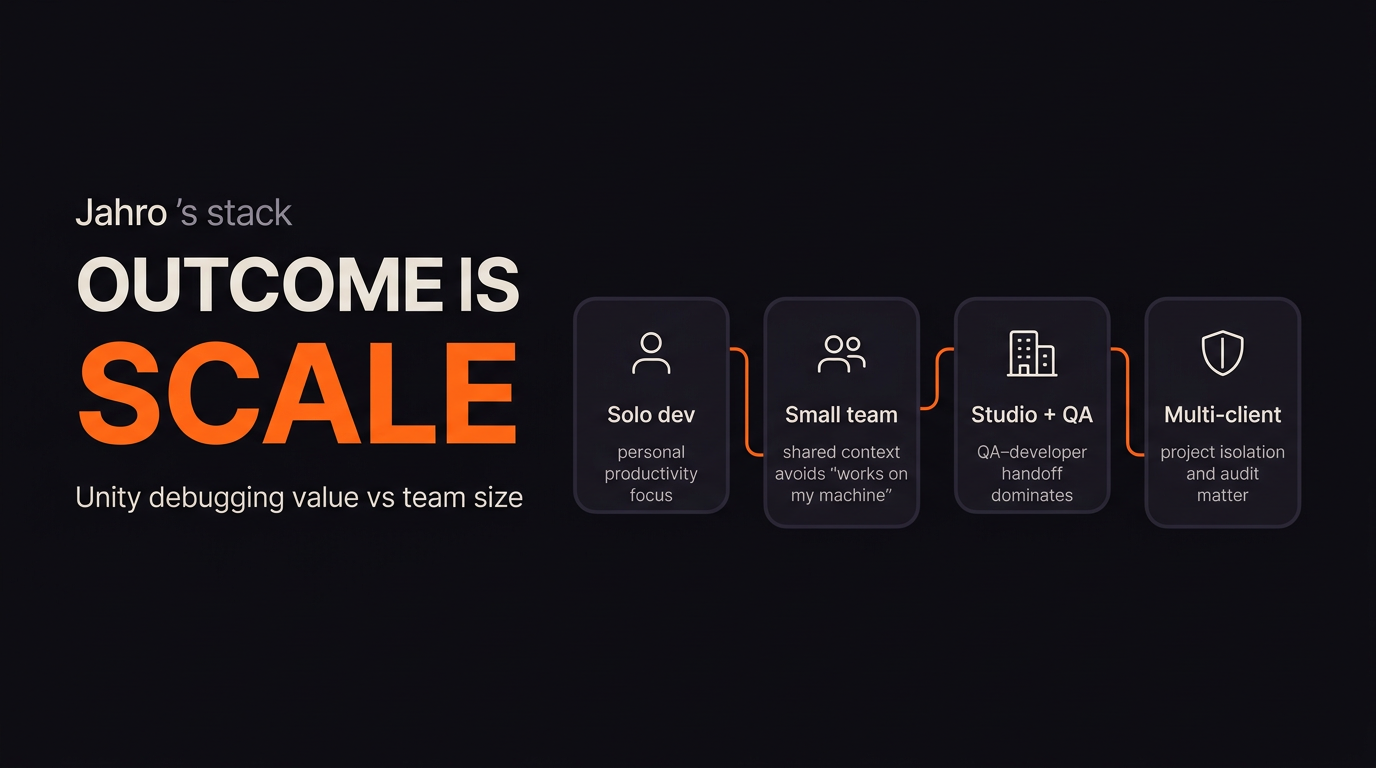
Past a handful of people, handoff quality beats individual typing speed.
Outsourcing and multi-client studios
Work-for-hire and co-dev shops hit an extra constraint: client isolation. A debug pipeline that mixes sessions across games is a non-starter when unreleased IP is in play. Commentary on outsourced QA often calls out inconsistent handoff standards and billing fights when “Cannot Reproduce” has no evidence. A studio that can say “every report includes a timestamped session with logs” turns debugging into a deliverable instead of a chat thread.
If you serve multiple publishers, evaluate project-scoped access the same way you evaluate source branches.
QA cycle time — what external studies claim
Aggregated B2B QA research often claims material cuts in resolution time when teams adopt collaborative defect platforms — use that as order-of-magnitude motivation, not a promise. Public case material from large mobile publishers describes moving off email and spreadsheets to centralized test management; quoted outcomes include hours saved per month for leads and better coverage, with the usual caveat that vendor case studies pick winners.
Separate game-industry sources (for example testing-vendor research blogs) cite fewer escaped defects and faster regression cycles when structured QA infrastructure exists; one mobile case study in that literature reported shorter release cycles after tightening QA workflow. Your mileage depends on discipline — tools do not replace test design.
Faster QA cycles come from clear ownership plus better artifacts, not from dashboards alone.
Honest comparison — where common tools win
No serious buyer wins by pretending one product sweeps every column. ADB logcat and Xcode Console are precise and free for engineers who already have devices on hand; they break down when the person who saw the bug has no SDK installed. SRDebugger and Lunar Console are entrenched for on-device viewing; SRDebugger’s purchase model can work for solo developers, and Lunar Console’s open model is easy to trial. Firebase Crashlytics and similar services own production stability; they are poor substitutes for interactive QA sessions because they optimize for fleet aggregates, not reproducing a specific tester action on a pre-release build.
Jahro’s positioning in internal competitive analysis is not “replace Crashlytics.” It is QA-to-developer collaboration: capture in the build, review on the web, share without exporting text files. That is a different layer than Asset Store consoles or OS tools. For a full matrix, see Unity debugging tools compared (2026).
Stack tools by question type — live session versus production fleet versus native profiling — not by brand loyalty.
What standardization looks like in the web console
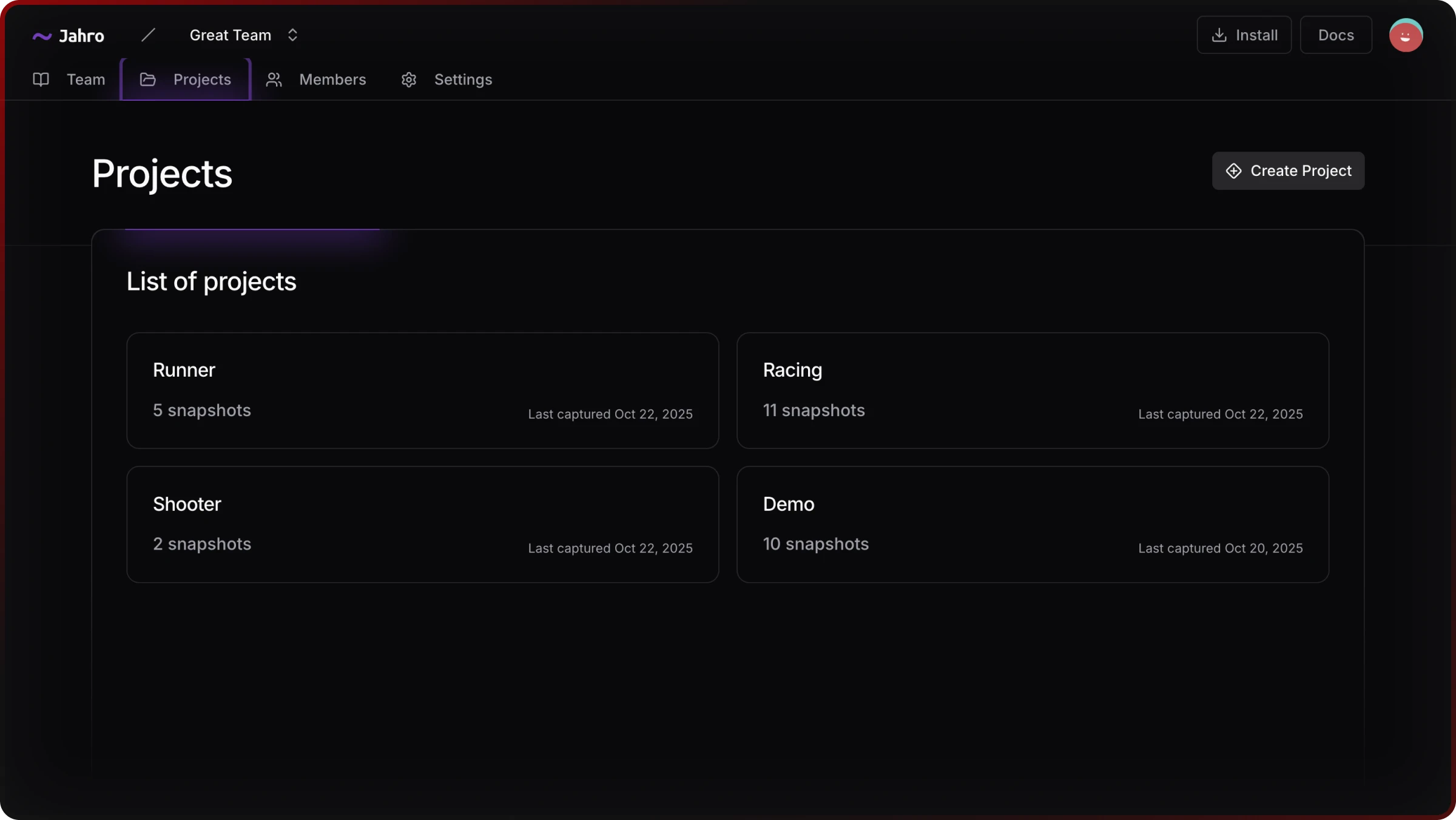
Multi-project studios need a place where sessions are grouped by game, not lost in a single local buffer. Jahro’s web console lists projects and snapshot counts so leads can see activity without asking for screenshots.
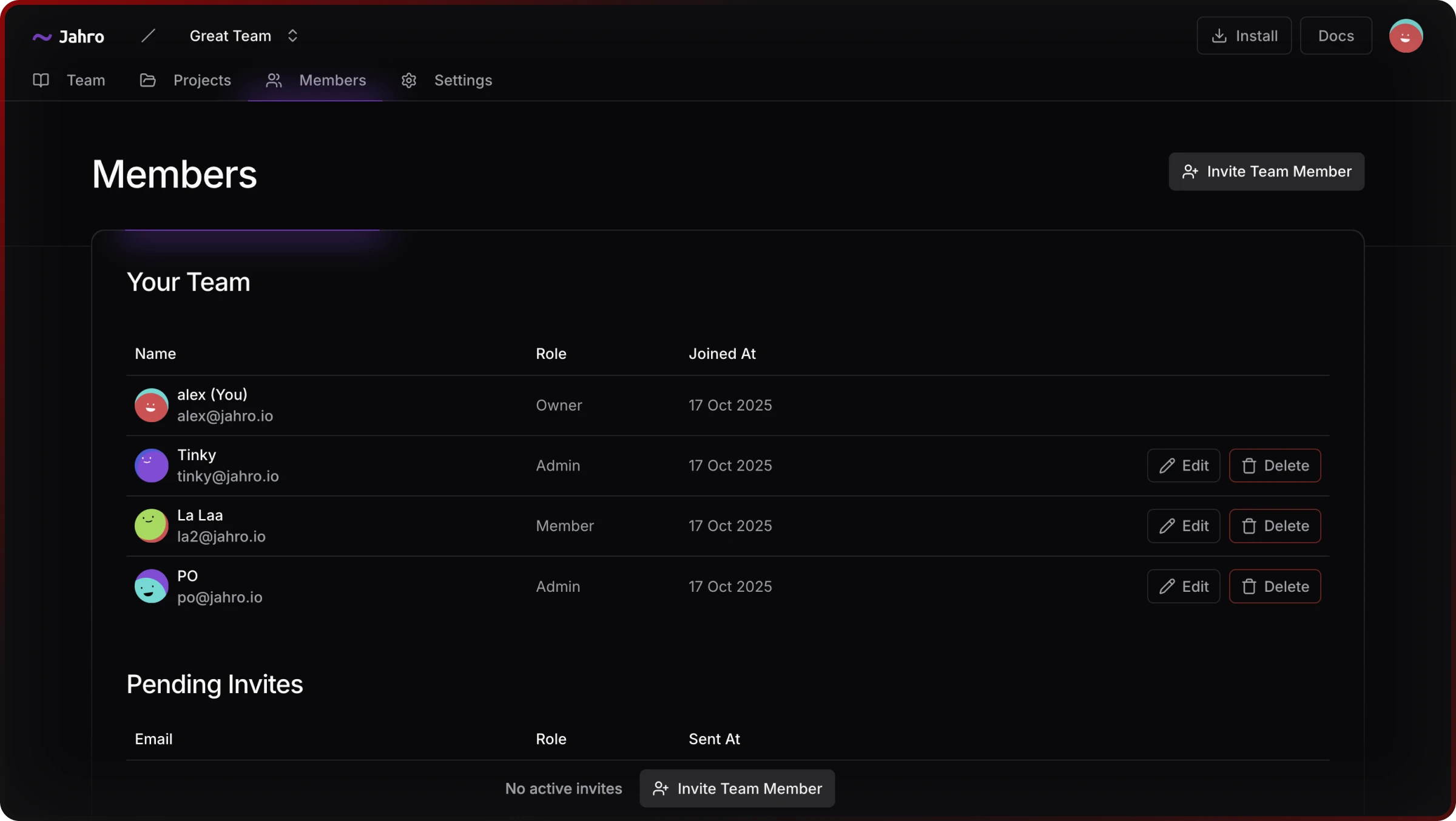
Role-based access is the other half: developers, QA, and viewers see only what their job requires. That maps to procurement questions about contractor offboarding and QA-only seats.
A studio standard should also include a shareable artifact. Link-based sharing lets someone without the Unity project open the same timeline the tester saw — the difference between “trust me” and “here is the session.”
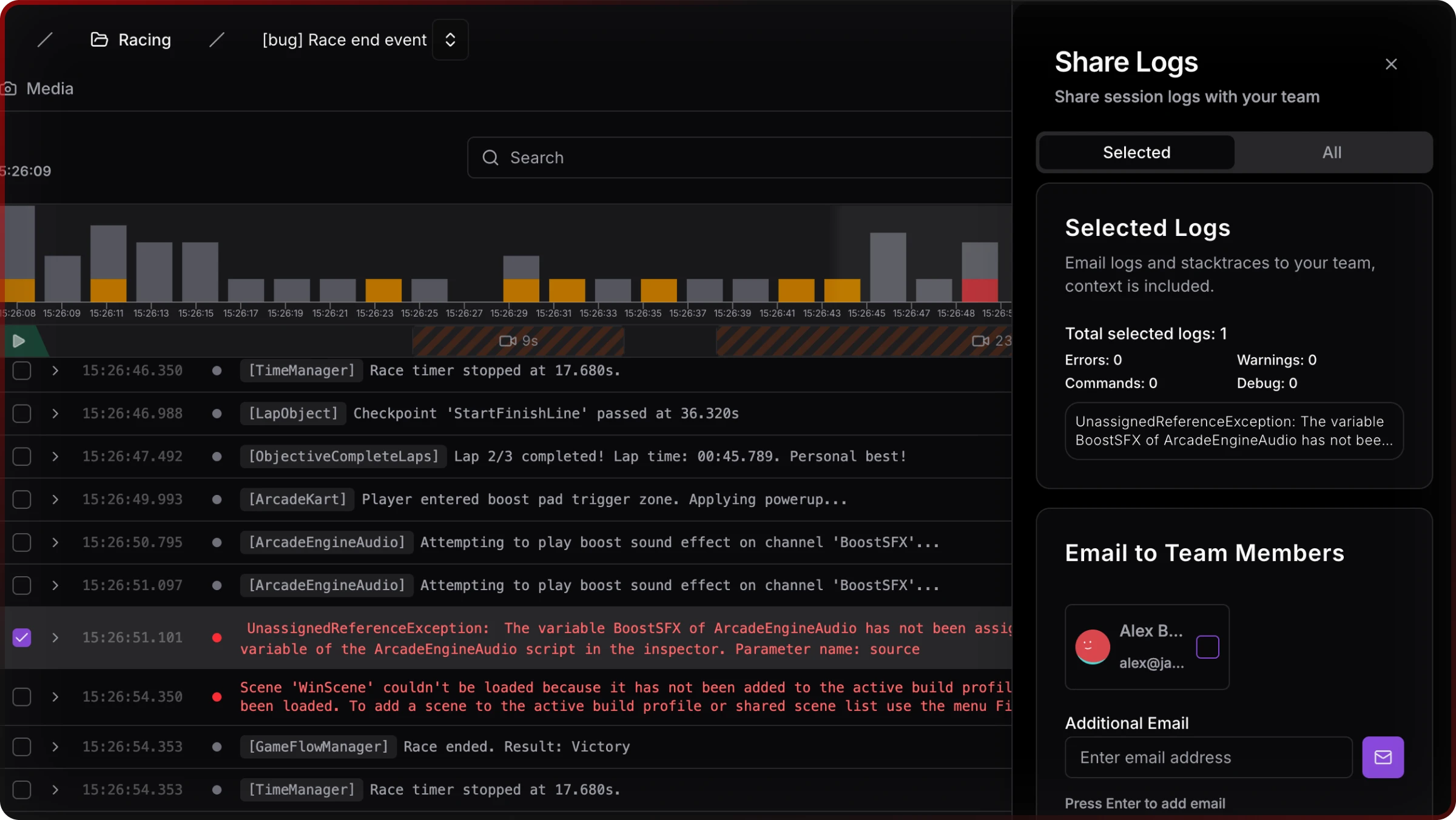
Standardization means one place to look, rules for who may look, and one link format attached to tickets.
Where Jahro fits (and does not)
Jahro is a Unity SDK plus web console aimed at mobile QA and engineering teams who want snapshots, commands, and logs without tethering every tester to developer tooling. It does not replace Unity Profiler for frame budgets, Instruments for native memory, or Crashlytics for live fleet health. It competes on handoff latency and artifact quality — the same niche summarized in strategy work as the “collaboration layer” between the device and the bug tracker.
If your studio is evaluating a standard, run vendors through the same script: capture without SDKs on QA laptops, review without the device, project isolation for outsourcing, role-based access, and integrations your producers already use.
Pick infrastructure that survives the next project and the next hire, not only today’s build.
Related reading
For operational QA stages and device strategy, read Unity mobile game QA workflow for studio teams. For tool-by-tool tradeoffs, use the comparison matrix in Unity debugging tools compared (2026). For unreliable repros, see When you can’t reproduce a Unity bug.