How to add a cheat console to a Unity game
Unity does not ship a cheat console you can open at runtime. The Editor has a Console window for logs, and development builds expose Unity's developer console for log output, but neither runs your own commands like givegold 500 or loadlevel boss. To get that, you build one or import a plugin.
This guide covers both paths and the parts most tutorials skip: mobile input, scene lifetime, type conversion, and stripping cheats out of release builds.
What a cheat console actually is
A cheat console (or in-game debug console) is a runtime UI that takes text commands, maps them to C# handlers, and changes game state without a recompile. The same overlay you use to skip a level, spawn an enemy, or toggle god mode while the build is running on a phone or in the Editor.
The same machinery covers three jobs:
- QA reproducing edge cases without replaying every prerequisite step.
- Designers tuning balance live during a play session.
- Developers debugging without baking new flags into Player Prefs.
It is not the same as Unity's Editor Console window (logs only) or Unity's developer console (log output for development builds). Both are useful. Neither lets you type spawnenemy boss 3.
Does Unity have built-in console commands?
No. The closest APIs are:
Debug.developerConsoleEnabledfor surfacing the built-in log console in development builds.Debug.isDebugBuildfor runtime gating of debug-only paths.Debug.Logfor output that any custom console will mirror.
None of these are a command shell. Forum threads like How to console commands? and Making a Cheat Console all end the same way: roll your own or grab a plugin.
If you searched for "unity cheat console" or "unity console commands," you are looking for a pattern, not a Project Setting.
Build a cheat console from scratch
The minimum shape is an input UI, a dictionary of commands, a parser, and a way to keep the thing alive across scenes. Half a day in the Editor. Add mobile gestures and release stripping and it stretches into a couple of days.
1. UI layer
You need:
- An
InputField(or TMPInputField) for typing. - A scrollable log area for output.
- A toggle that opens and closes the overlay. Backtick (
~) or F1 on desktop, a gesture or button on mobile.
Input.GetKeyDown is fine for desktop. On phones it does nothing useful. The mobile section below covers the patterns that work.
2. Command registry
A dictionary from name to handler is enough to start.
public class CommandRegistry : MonoBehaviour
{
    private readonly Dictionary<string, Action<string[]>> _commands = new();

    void Awake()
    {
        Register("godmode",   _    => Player.SetGodMode(true));
        Register("givegold",  args => { if (args.Length > 0 && int.TryParse(args[0], out var n)) Player.AddGold(n); });
        Register("loadlevel", args => { if (args.Length > 0) UnityEngine.SceneManagement.SceneManager.LoadScene(args[0]); });
        Register("spawnenemy", args =>
        {
            if (args.Length == 0) return;
            var count = args.Length > 1 && int.TryParse(args[1], out var n) ? n : 1;
            SpawnManager.Spawn(args[0], count);
        });
    }

    public void Register(string name, Action<string[]> handler)
        => _commands[name.ToLowerInvariant()] = handler;

    public void Execute(string raw)
    {
        var tokens = raw.Trim().Split(' ', StringSplitOptions.RemoveEmptyEntries);
        if (tokens.Length == 0) return;

        var name = tokens[0].ToLowerInvariant();
        var args = tokens.Skip(1).ToArray();

        if (_commands.TryGetValue(name, out var handler))
            handler(args);
        else
            Debug.LogWarning($"Unknown command: {name}");
    }
}
Reflection-based discovery (scanning for [Cheat] or [Command] attributes at startup) is optional polish. It is easy to break across assemblies and Unity's managed code stripping, which is why teams eventually adopt a maintained library.
3. Parse arguments and convert types
Most hobby consoles fail in the same three ways: a bad int.Parse takes down the build, a command touches the Unity API from the wrong thread, or a half-parsed command throws an exception that nobody catches. Defensive TryParse, a usage string per command, and running handlers on the main thread are the minimum you ship.
4. Survive scene loads
Put the console on a DontDestroyOnLoad object or recreate it from a bootstrap loader. Otherwise QA loses the overlay every time a scene transitions, and the bug they were chasing slips with it.
5. Strip or disable for release
Shipped commands are exploits waiting to happen. Economy manipulation, skipped IAP gates, competitive advantage, leaked debug content. Reasonable patterns:
- Wrap registration in
#if DEVELOPMENT_BUILD || UNITY_EDITOR. - Use
[Conditional("DEVELOPMENT_BUILD")]so call sites disappear from release IL. - Put cheat code in its own assembly definition that only compiles into dev builds.
Debug.isDebugBuild alone is weaker. The IL still ships, and a motivated player will find it. Treat it as a runtime guard, not your only line of defense (see the long thread Debug.isDebugBuild security for context).
Open the cheat console on mobile
Desktop tutorials assume a keyboard. On phones that breaks immediately. Three patterns work in production:
- A multi-finger gesture (three-finger tap, four-finger long-press).
- A small draggable on-screen button QA can find without instructions.
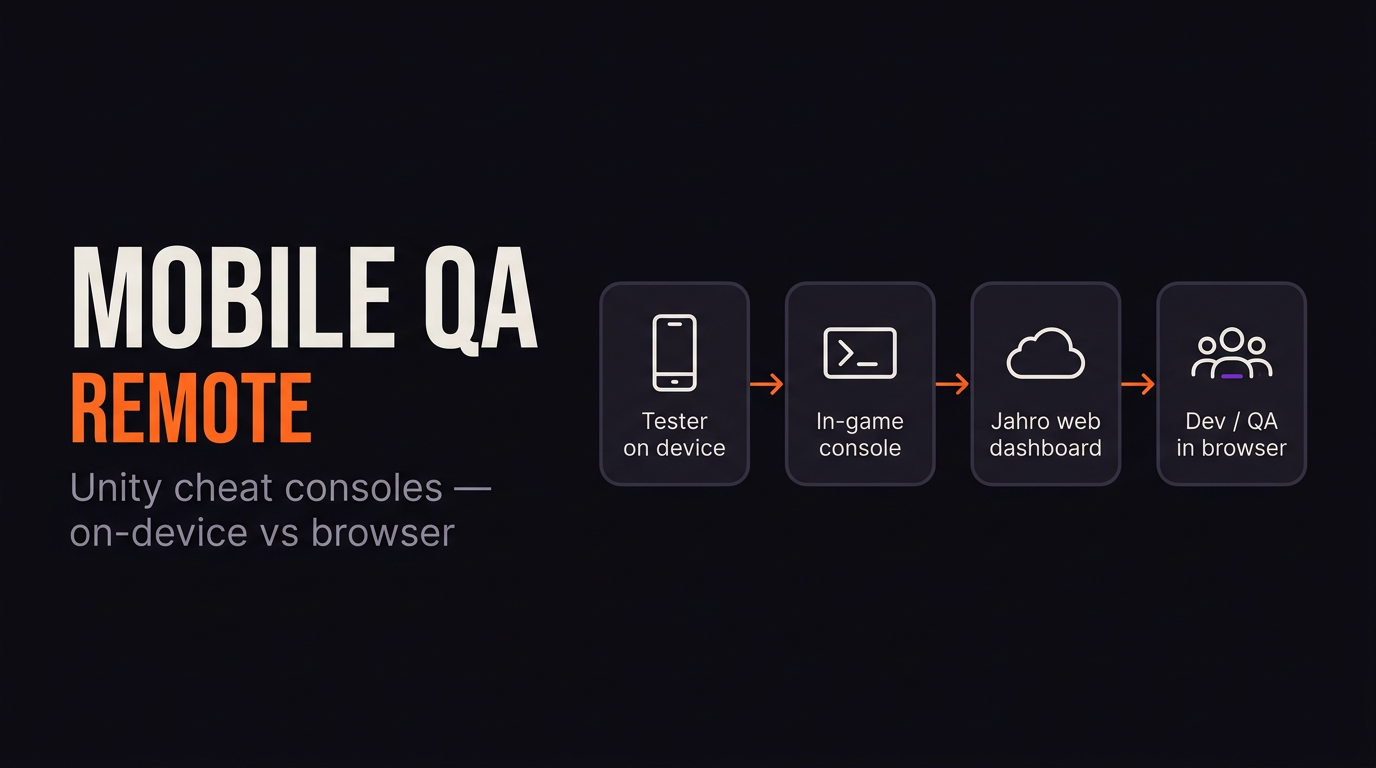
- Remote control from another machine on the same network, so testers do not touch the device at all.
The third option is what most teams mean by "cheat menu" when QA and engineering are not in the same room. Someone watches the device while another person fires commands from a browser. It cuts a lot of "tap the secret corner" friction once you have more than one tester.
Plugins worth comparing
Re-implementing autocomplete, mobile input, and release stripping is boring. A few options to weigh against a custom build. Prices change, check the source before buying.
| Tool | Command style | Mobile | Remote / web | Price |
|---|---|---|---|---|
| Jahro | [JahroCommand] + dynamic registration | Yes | Yes, web dashboard | Free tier |
| SRDebugger | [SROptions] panels (overlapping intent, not a shell) | Yes | No | Paid (~$25) |
| Quantum Console | [Command] attribute | Yes | No | Paid |
| CheatConsole (BenPyton) | [Cheat] attribute | Editor / dev focus | No | Free (GitHub) |
| DeveloperConsole (DavidF-Dev) | [ConsoleCommand] | Limited | No | Free (GitHub) |
| In-Game Debug Console (yasirkula) | Manual registration, log focus | Yes | No | Free (Asset Store) |
Notes from the field:
- SRDebugger is great for on-device debug panels without a USB tether. It is not a command shell.
- yasirkula's In-Game Debug Console is the standard answer if your only pain is reading
Debug.Logon a phone. - BenPyton/cheatconsole generates no cheat code in release builds at all, which is the right philosophy whether you import the package or copy the idea.
Pick log viewing, on-device panels, or commands plus collaboration on purpose. No row in the table wins every column.
Jahro: attribute commands and a visual cheat menu
Jahro targets mobile Unity teams that want commands, logs, snapshots, and sharing in one loop. The pitch on features: commands & cheats is short: tag a method, the console finds it. Setup lives in the Unity commands docs and Getting Started. The shape of the API:
Attribute-based commands
[JahroCommand]
public void ResetPlayerHealth()
{
    Player.Health = Player.MaxHealth;
}

[JahroCommand("add-gold", "Cheats", "Add gold to player wallet")]
public void AddGold(int amount)
{
    Player.Wallet.Add(amount);
}

[JahroCommand("spawn-enemy", "Spawning", "Spawn enemy at position")]
public void SpawnEnemy(string enemyType, int count)
{
    SpawnManager.Spawn(enemyType, count);
}
Primitives, Vector2, Vector3, and enums are converted from string for you, so handlers stay typed.
Dynamic registration
When commands come from generated data or a service locator:
JahroConsole.Register("toggle-fps", "Debug", "Toggle FPS counter",
    () => FPSCounter.Toggle());

JahroConsole.Register("set-timescale", "Debug", "Set time scale",
    (float scale) => Time.timeScale = scale);
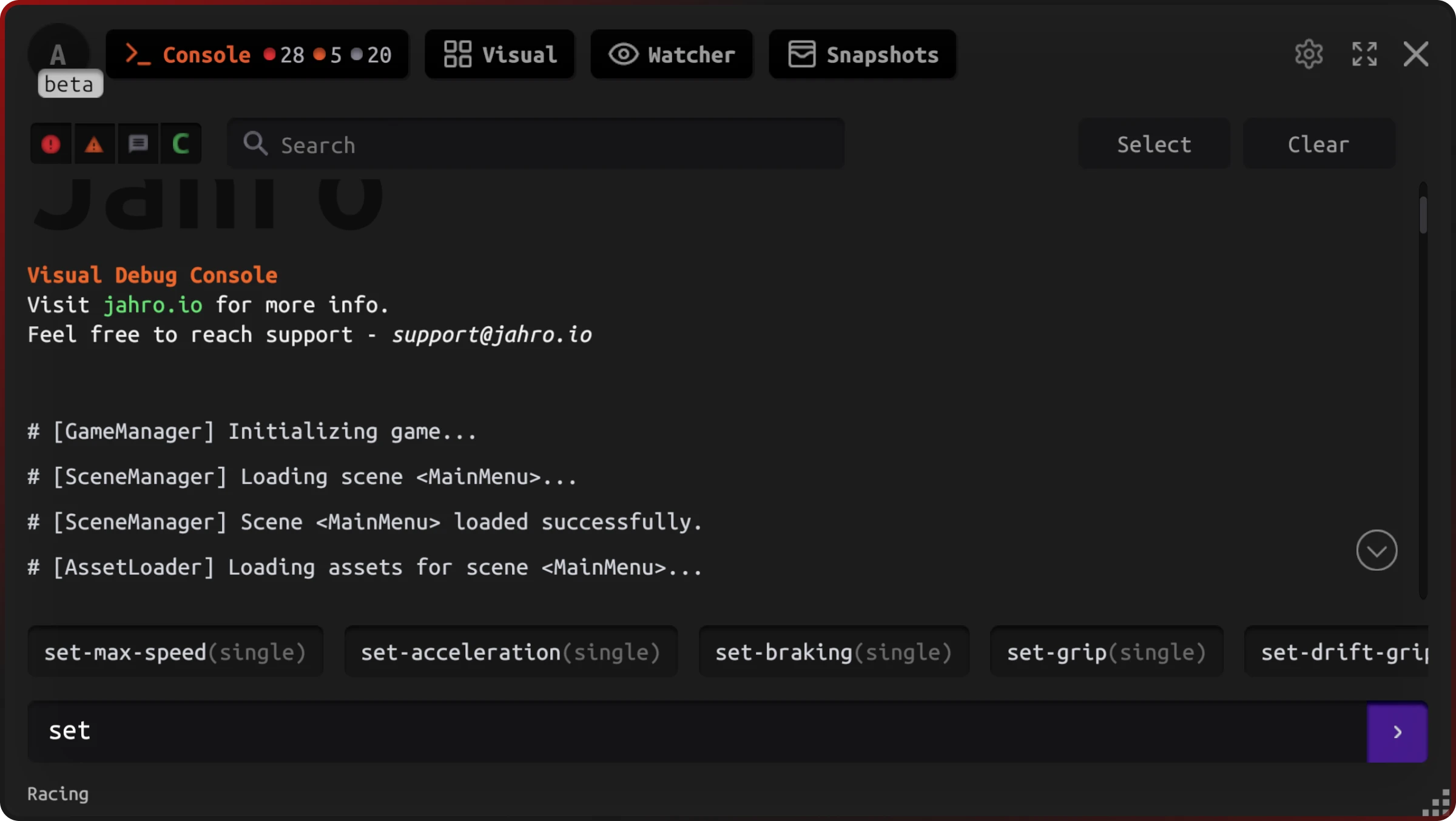
Text mode (for developers)
Type a command, get autocomplete, hit Enter. The fast path for anyone who knows the command names.
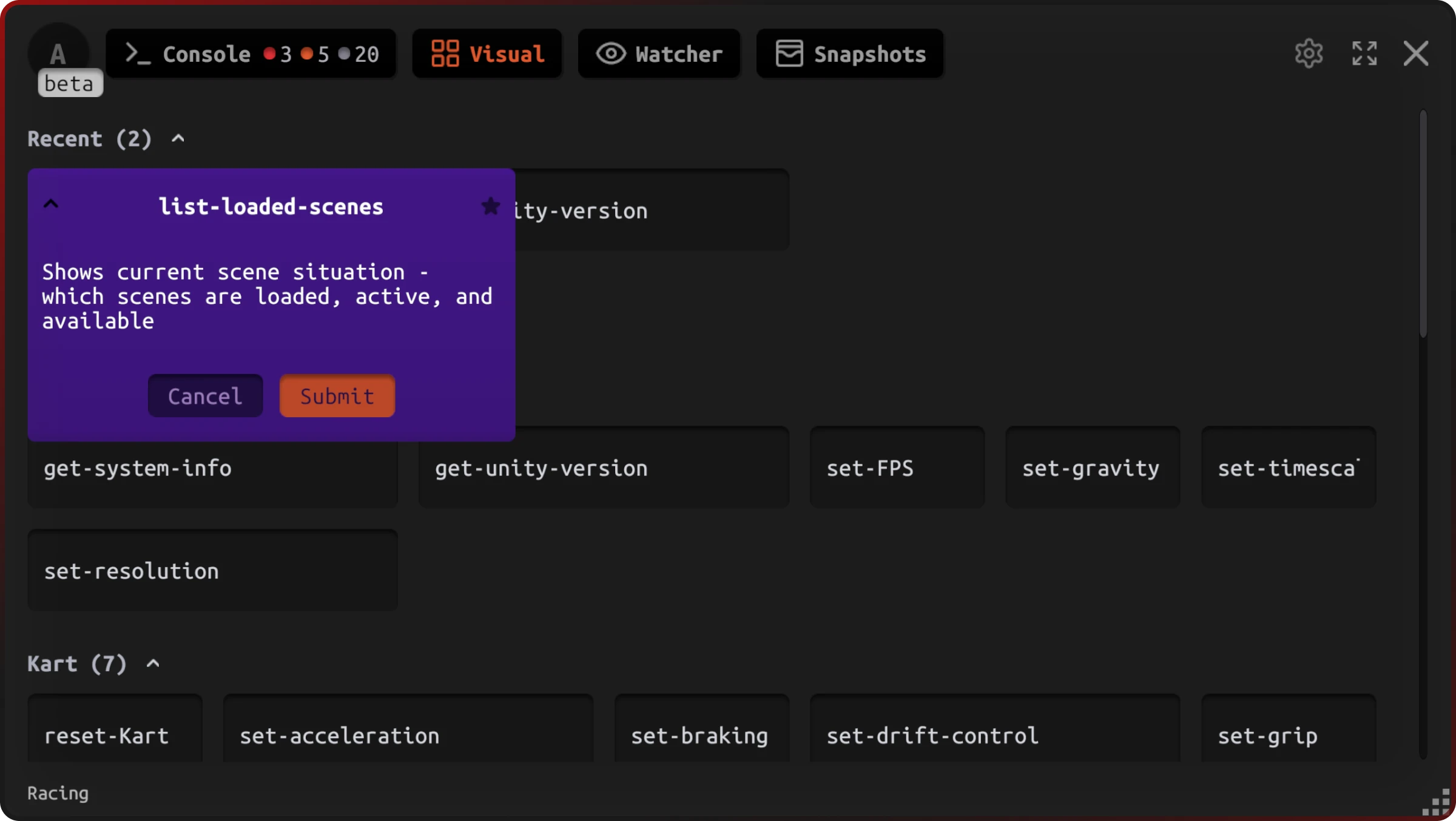
Visual mode (for testers and designers)
Commands grouped into buttons with parameter fields. This is the "cheat menu" most QA teams want, no syntax to memorise.
If you already use Jahro for logs or snapshots, [JahroCommand] is a small step to a console non-programmers can drive.
Add a cheat console without writing the parser
Tag a C# method with [JahroCommand]. Jahro builds the overlay, autocomplete, mobile gestures, and release-build safety. Works on Android, iOS, and in the Editor.
Useful Unity console commands to start with
Whether you build a registry by hand or use Jahro, these patterns cover most QA and design workflows.
For QA and testing:
loadlevel <name>to skip into bug territory.sethealth <value>,setlives <count>to reproduce edge states.spawnenemy <type> <count>to isolate combat scenarios.godmodeand anoclipanalogue to keep testers alive during partial builds.timescale <factor>for animation bug repro.
For design and engineering:
teleport <x> <y> <z>orteleport <marker>.togglefeature <flag>forScriptableObjector remote-config flags.setbalance <constant> <value>for live tuning when build time is high.
For diagnostics:
togglefps,togglecollisions,togglenavmesh,toggleaistate.forcegcfor spike profiling (skip in production-like captures).- Pair every command with log capture so each run leaves a trace your team can share.
Start with scene load, player state, and spawn. They cover most tickets your QA writes.
Keep cheats out of release builds
BenPyton's CheatConsole README puts the standard plainly: the console is available in Editor and development builds, and "no code are generated in release build, thus players cannot enable the cheat console in the game using tools." That compile-time mindset is the bar.
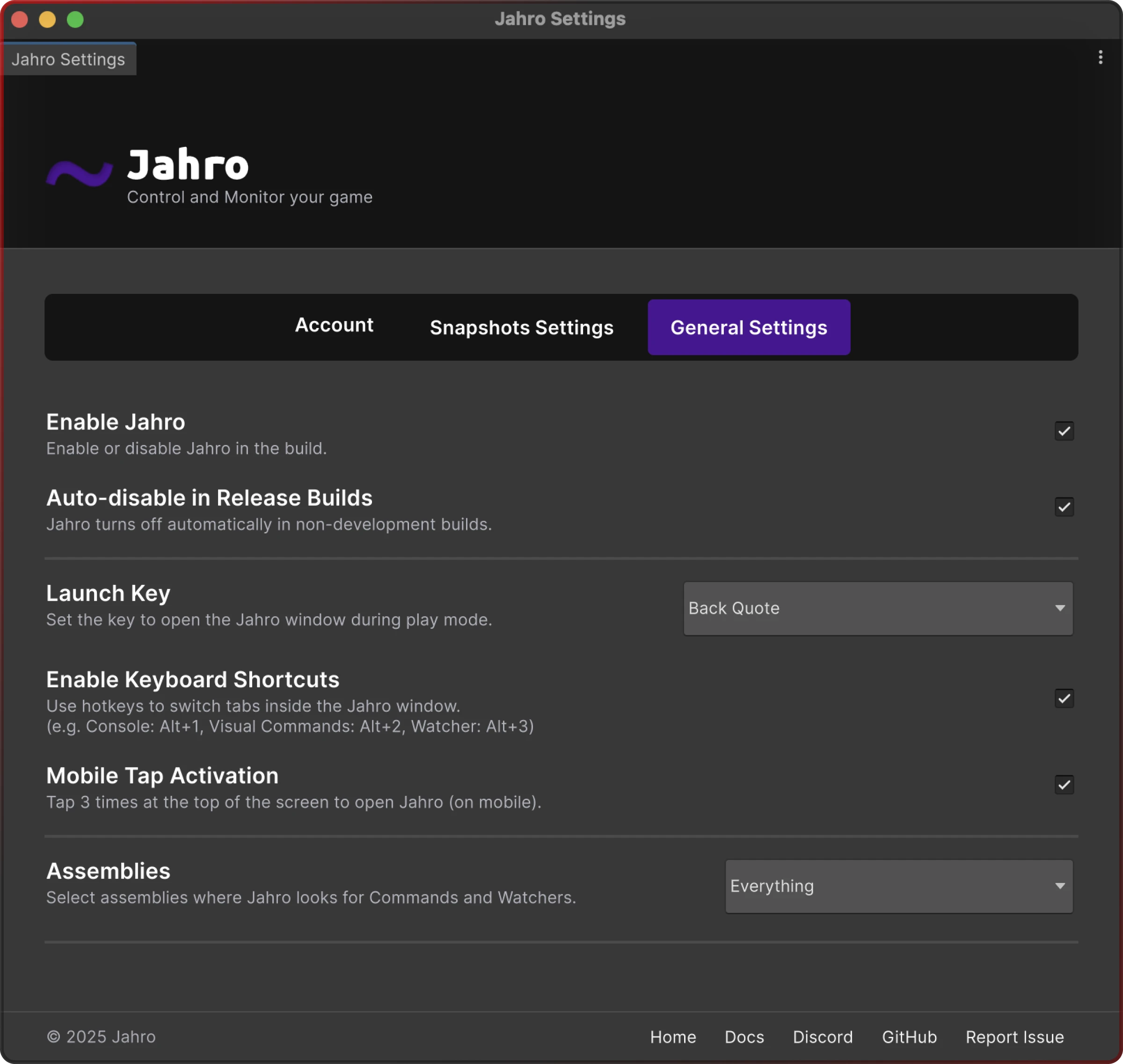
Jahro follows the same idea. Discovery and registration drop out of production so [JahroCommand] does not become a shipped attack surface. The Editor settings have an explicit auto-disable for release builds:
Treat cheats like keys to your database. If they ship, assume someone will find them.
FAQ
How do I add cheat codes to a Unity game?
Build a small command registry (a dictionary mapping names to C# handlers) or use an attribute-based plugin. Parse input with TryParse, run handlers on the main thread, and gate the whole thing behind development builds so release players cannot invoke commands.
Does Unity have built-in console commands?
No. You get the Editor's Console window for logs and Unity's development-build log console. Neither runs your own commands like givegold 500. Custom command shells are always something you build or import.
Should I build my own debug console or use a plugin?
If you only need a backtick overlay with five commands, build it. If you care about mobile UX, autocomplete, multi-tester workflows, and release stripping, a maintained plugin saves days. Compare the columns you actually need (logs, commands, remote QA) before paying for an Asset Store package.
Are cheat console commands safe to ship in production?
Only when the registration code does not exist in the release binary. A boolean flag is not enough. Prefer [Conditional] attributes, #if DEVELOPMENT_BUILD wrappers, or a separate cheat assembly that never compiles into player builds.
How do I open a cheat console on mobile?
Use a multi-finger gesture, a small on-screen button, or remote control from a browser on the same network. Pick one your QA can find without instructions and document it in the team handbook so it is not tribal knowledge.
Can I use a cheat console for balance tuning?
Yes, and it is often the highest ROI use after teleport and skip commands. Expose setters for HP, damage, drop rates, and Time.timeScale so designers iterate during a session instead of waiting on a new build.
Next steps
- Unity commands reference, full attribute syntax, categories, and limitations.
- Getting started, package install and API key flow.
- Unity QA workflow for teams, how capture-and-share fits next to commands.