Unity QA bug reporting for mobile games
Unity QA bug reporting is what happens when you turn a defect on a phone or tablet into something a developer can use: steps that reproduce, real environment facts, and logs instead of a gut read. On mobile the usual miss is a screenshot in Slack, which rarely shows what the engine did. Below: what “complete” looks like, what the research says about bad tickets, how teams set up process, and a straight take on tools and capture.
A good report is one a developer can triage without chasing the tester for a second interview.
Why vague tickets are expensive
You know this loop: QA files a screenshot and loose steps. A developer tries on another device, clean save, different patch level, and nothing happens. The ticket sits in “Needs info,” goes stale, or closes Cannot Reproduce. The bug shows up again after ship.
Joorabchi et al. (Works For Me!, MSR 2014) dug through tens of thousands of reports: about 17% were non-reproducible on average, and those tickets stayed open about three months longer than reproducible ones. About 14% of non-repro failures were blamed on insufficient information. Roughly two-thirds of non-repro tickets that eventually got “fixed” were reproduced later — the bug was real; the writeup was not.
QA blogs and training material often say more than half of bug reports lack steps, expected outcome, or setup detail (see QA Wolf on what makes a great bug report and similar writeups). The “~70% missing everything important” line is a rough literature-scale warning, not a forecast for your studio — still, the pattern holds: first-pass reports are usually incomplete.
The old IBM curve still gets quoted: cheap to fix in design, pricier in QA, brutal once users see it — often summarized as about 100× worse in production (CloudQA’s 2025 writeup walks through CISQ-style numbers). Exact dollars matter less than the shape: bugs that slip past QA cost disproportionately. Big round figures (CISQ’s $2.41 trillion “cost of poor software quality,” surveys saying 30–50% of time goes to defects and rework) are noisy, but they point at the same thing: this is payroll-scale drag.
Incomplete reports are a normal, expensive failure mode — and “insufficient info” shows up in the data, not just in sprint retros.
What breaks first on Unity mobile
Mobile Unity builds do not hand testers Debug.Log streams the way the Editor does. Without ADB (Android) or Xcode (iOS), most QA staff cannot pull logs at all. So tickets arrive with screenshots but no sequence: you see the frame, not the exception order.
Other gaps repeat across studios: no device metadata (model, OS, RAM, GPU), no build identity, inconsistent templates (Jira vs Slack vs email), state-heavy bugs described as “I was in the shop” without save context, and distributed teams where the developer never touches the failing device.
Strong teams write tickets for a stranger who was not in the room. Weaker teams write for themselves — enough to jog memory, not enough to reproduce cold. Testing shops like KiwiQA and iXie Gaming hammer that distinction. Unity’s own guidance pushes dedicated QA and keeping discussion in the issue tracker for anything long-lived (Unity on testing and QA).
On mobile you are fighting log access and hardware diversity. Training people to “write better steps” does not fix either by itself.
The inadequate-capture loop (and what breaks it)
| Typical failure path | What fixes it |
|---|---|
| Screenshot + memory-based steps in chat | Mandatory template: steps, expected/actual, build, device/OS, logs |
| Developer on different hardware / save | Device matrix + explicit starting state in every report |
| No log stream for QA | In-build capture, custom buffer, or developer-assisted ADB — pick one per build type |
| Ticket not tied to an artifact | Tracker row links to one canonical log package (URL, attachment, or field) |
Breaking the loop takes standard fields, logs non-engineers can actually get, and tickets tied to build numbers. The sections below unpack that.
Process says what ought to exist; tools decide whether testers can deliver logs and metadata when the clock is running.
What a complete Unity mobile bug report contains
Use this as a checklist for Jira, Linear, GitHub Issues, or Notion — the important part is enforcement, not the brand of tracker.
Environment / device: Model, OS version, available RAM, GPU where relevant, network state (Wi-Fi, cellular, offline), app version / build number, Unity version.
Reproduction: Numbered steps, each with action and expected result, plus explicit starting state (cold launch, resumed save, post-tutorial, and so on).
Behavior: Expected vs actual — forces a clear defect statement.
Severity: Agree on definitions (crash vs progression blocker vs cosmetic).
Logs: Timestamped Debug.Log / warnings / errors, with stack traces for exceptions. This is the field most often missing and the one developers need first.
Media: Screenshot or short video for UI and timing issues.
Game state: Progression, inventory, feature flags, cheats used — whatever your design makes relevant.
Frequency: Always / often / sometimes / rare, plus triggers (“after ~20 minutes”, “first install only”).
Testomat.io summarizes case patterns where tighter tracking correlated with 30–40% fewer escaped defects and 20–25% faster regression — take the percentages as directional, not a promise for your team, but it matches what a lot of leads see after they stop accepting empty tickets.
If logs are optional on the template, they disappear the moment someone is in a hurry.
Solving the log capture problem (ranked options)
1. In-game capture integrated with sharing — Tester triggers capture from the build; logs and metadata leave the device without USB. Fits remote QA; requires engineering to ship the SDK in test builds.
2. Custom in-game log buffer — You build an on-screen buffer and export. Full control, ongoing maintenance, and you still need a delivery story (file share, email, upload).
3. ADB / Xcode — Ground truth for many developers; poor fit for distributed QA that will not install platform tools or use cables.
4. Production crash analytics — Unity Gaming Services Cloud Diagnostics and similar services are built for automatic crash and exception telemetry from production builds. They are not a stand-in for a manual QA session unless you wire them in deeply — and someone still has to capture reproduction detail for bugs that are not crashes.
Pick the lightest option that puts timestamped Unity logs on every QA build ticket, not only when a dev has a cable and ten free minutes.
Tooling landscape — honest notes
No single product covers everything. This table is about QA reporting and handoff, not “which console a programmer likes at their desk.”
| Tool / approach | Strengths | Limitations for QA bug reporting |
|---|---|---|
| Unity Cloud Diagnostics (UGS) | Automatic crash and exception data from production; Unity ecosystem integration | Oriented to live telemetry, not interactive QA sessions; not a replacement for structured manual QA reports without workflow design |
| SRDebugger | On-device console, bug reporter with screenshot + logs to email | Email-centric handoff; no collaborative web dashboard or session history in the sense of a shared triage surface; package update cadence has been slow — evaluate compatibility with your Unity versions |
| Lunar Console | Fast native iOS/Android console, open source, low overhead | Developer-facing; no built-in snapshot + web review workflow for cross-role teams |
| Bugfender | Remote logs for mobile apps | General mobile SDK, not Unity-first; pricing and integration assumptions may differ from game pipelines |
| BetaHub | Unity plugin for basic in-game reporting | Indie/beta-oriented; lighter on session history and team dashboards than enterprise-style QA workflows |
| Jahro | In-game console, one-tap snapshot, web dashboard, session history, team sharing | Requires adoption and build integration; not a crash analytics replacement for production on its own |
Unity Cloud Diagnostics fits many production crash questions. SRDebugger and Lunar are solid developer consoles. Jahro targets QA-to-developer handoff (in-game visibility plus shareable session artifacts). Plenty of studios run more than one of these.
Match the tool to the problem: production crashes vs manual QA evidence vs a solo dev on-device console.
Connect reports to Jira, Linear, or GitHub
The issue tracker is still the spine. Capture tools should feed it, not try to replace it.
Jira: Custom fields for Unity build, device model, OS make search and dashboards usable; link issues to fix versions tied to CI outputs. Unity documents Jira integration paths for DevOps workflows (Unity Jira configuration).
Linear: Labels for platform, severity, and area (UI, gameplay, netcode) keep triage fast; webhooks and GitHub links help engineers tie fixes to PRs.
GitHub Issues: Milestones per build or release train; labels for platform; straightforward for small teams.
Rule: Every defect references the build artifact it was found on — not “this week’s QA build” without a number.
A perfect log on the wrong build burns the same afternoon as no log at all.
Device matrix — minimum bar
Mobile defects cluster on GPU families (e.g. Adreno vs Mali), RAM pressure, and OS behavior (permissions, audio sessions, background rules). A practical minimum:
- One low-end Android (Android 12–13)
- One mid-range Android (current OS)
- One high-end Android
- One older iPhone (still-supported iOS)
- One recent iPhone
When a report includes model + OS + GPU, triage can ask “Adreno-only?” or “iOS 17 regression?” instead of brute-forcing every combination. BrowserStack’s Android fragmentation overview is a readable backgrounder if you need to explain why to leadership.
Breadth on the matrix beats buying one flagship and calling it done.
QA–developer handoff protocol
If you never write this down, the proof lives in DMs and disappears. A pattern that tends to survive:
- Tester reproduces or hits the defect on a matrix device.
- Capture includes logs + screenshot + device metadata (manual template or automated snapshot).
- Ticket created or updated with build number, severity, steps, and a link to the full artifact.
- Developer reviews without physical device access when possible.
- Fix verified on the same class of device/OS when feasible.
The usual choke point is step 4: the developer still cannot get logs unless the tester reproduces while plugged in. Shareable session views exist to close that gap.
Decide where the log lives (URL, attachment, ticket field) before the sprint — not after two teams have argued about it in Slack.
Where Jahro fits (optional integration)
If you standardize on Jahro for test builds, the moving parts line up as follows: developers install the Unity package, configure projects and snapshot modes, and expose commands QA needs (skip tutorial, grant currency, jump level). Testers open the in-game console on device — no ADB or Mac — and use Snapshot when something fails. Sessions appear in the web console; testers paste links into Jira or Linear.
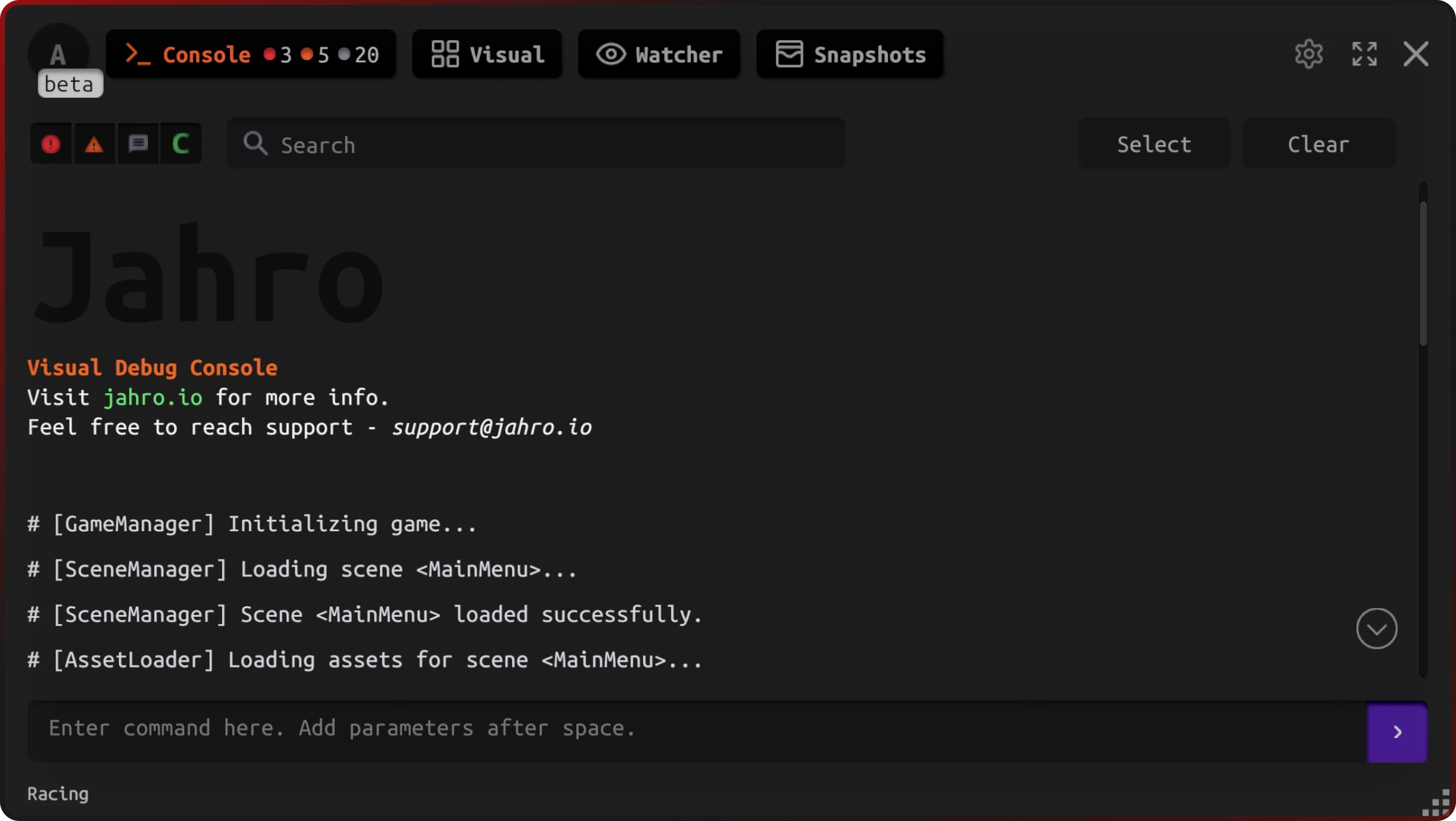
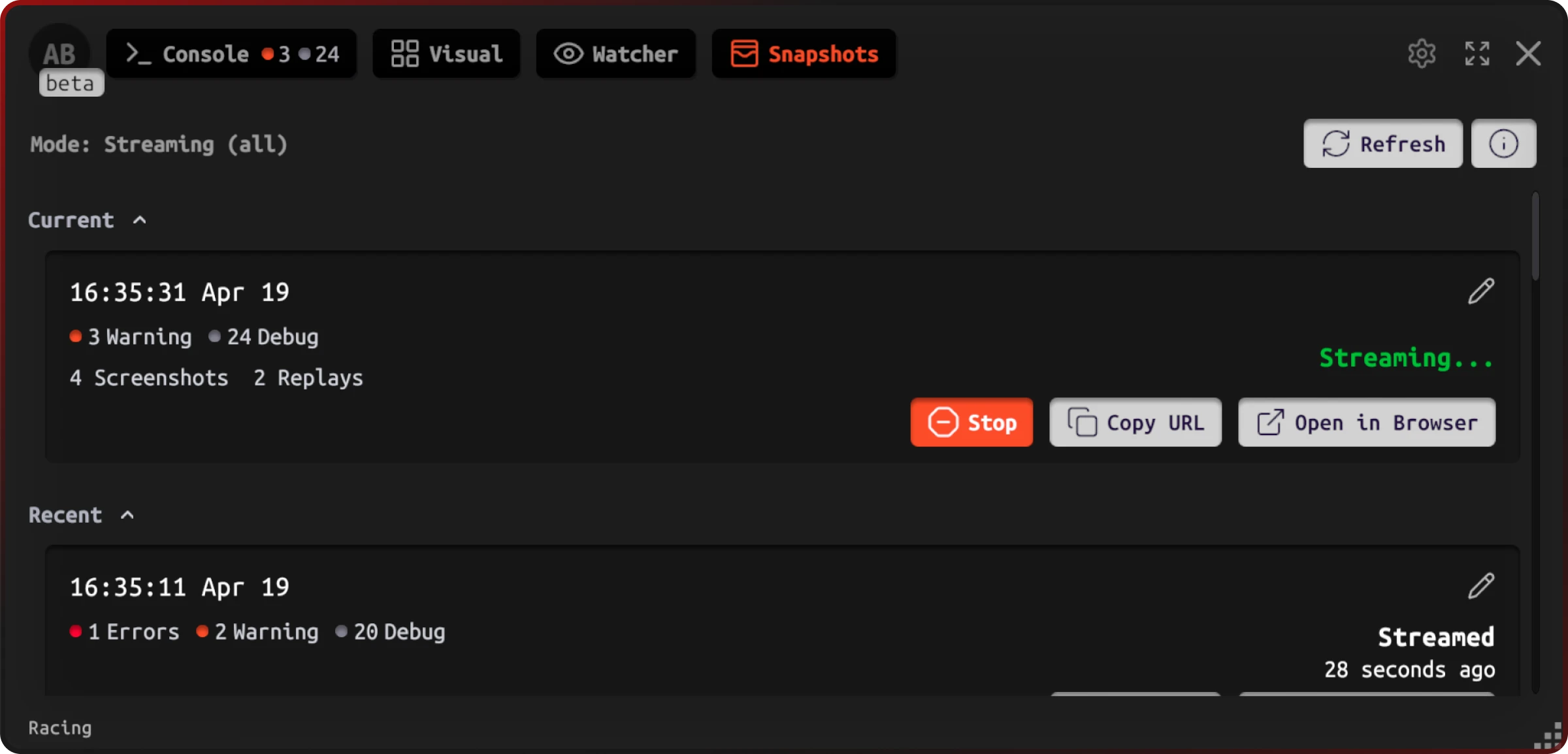
Snapshot streaming gives testers Copy URL and Open in Browser while a session is active — useful when a defect flickers and you need the team to see the same stream.
Developers triage from the logs viewer — filters, search, and selection for sharing — without plugging in the phone.
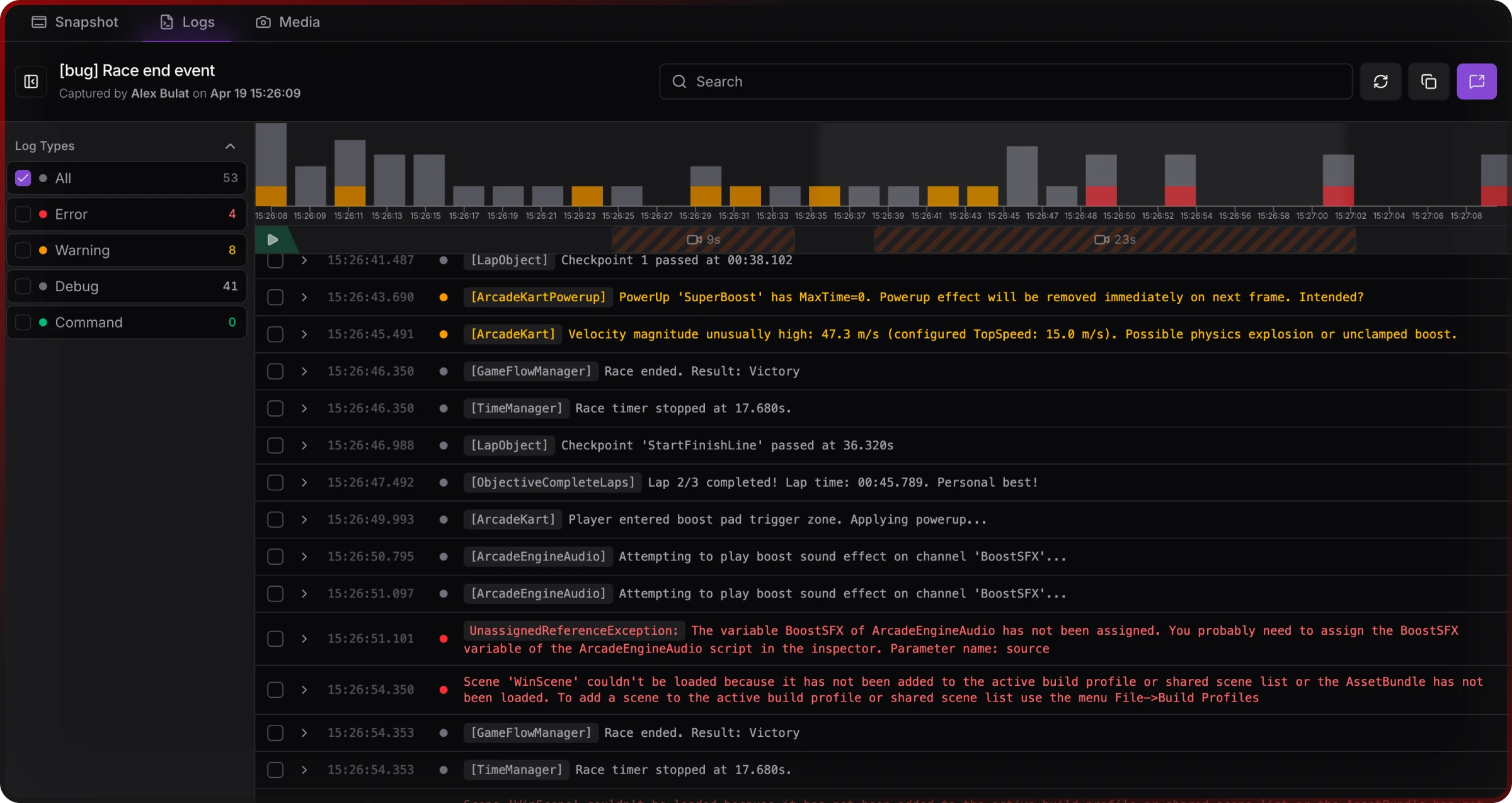
Session history helps intermittent issues — memory growth, save corruption — where the key line appeared before the tester thought to snapshot.
None of this replaces severity rules, who owns triage, or release gates. A tool strips friction; it does not design your process.
Treat capture as part of definition of done for QA builds, not a skunkworks project someone forgot to kill.
Related reading
- Why you can't reproduce that Unity bug — hardware, OS, state, and evidence gaps in depth.
- Unity QA workflow for teams — org-level handoffs and tooling evaluation.
- Android logs without ADB and iOS logs without Xcode — platform-specific capture paths.
- Jahro vs SRDebugger — feature-level comparison when you are choosing a console-class tool.
FAQ
What should a Unity bug report include?
The numbered list in the FAQ at the top of this page is formatted for snippets. On mobile the part that actually moves tickets is usually logs plus environment, not how polished the paragraph sounds.
How do QA testers share logs with developers in Unity mobile games?
ADB and Xcode are the classic paths; they scale poorly to non-engineer QA. In-build capture plus a shareable artifact avoids tethering — see the ranked options above.
What's the best bug reporting tool for Unity mobile games?
Depends what you are solving. Production crashes want crash analytics. A dev at a desk can live on SRDebugger or Lunar. QA handoff with shared sessions needs something built for that (Jahro is one option). Plenty of studios run more than one tool.
How do you connect Unity bug reports to Jira or Linear?
Ticket = system of record; logs and metadata = attachments or links. Custom fields / labels for build, device, OS. Always cite the exact build.
Why can't developers reproduce QA-reported Unity mobile bugs?
Different device/OS/state, timing, and missing logs — research on large trackers shows non-reproducibility and insufficient information as recurring themes (Joorabchi et al., MSR 2014).
What device matrix should a Unity mobile QA team test on?
At minimum one low-end Android, one mid-range Android, one high-end Android, one older iPhone, one recent iPhone — see the matrix section for why GPU and OS coverage matter.
Sources and further reading
- Joorabchi, Mesbah, and Kruchten (2014). Works For Me! Characterizing Non-reproducible Bug Reports. MSR. ACM
- CloudQA — How Much Do Software Bugs Cost? 2025 (CISQ / industry cost figures)
- QA Wolf — What makes a great bug report
- Testomat.io — Game testing management (structured tracking outcomes)
- Unity — Testing and QA tips
- KiwiQA — Art of bug reporting in game testing
- iXie Gaming — The art of bug reporting
This guide is independent documentation. Jahro is one possible capture and sharing layer for QA builds; evaluate against your stack and compliance needs.